Groply Guides
🏬 Stores Log In Start Free Trial
πŸͺ Merchant Milestone Β· 3 min read

Stage 1: Merchant Sign Up & Quick Login

Create your verified store account in 30 seconds with Google or your WhatsApp phone number.

Screenshots:
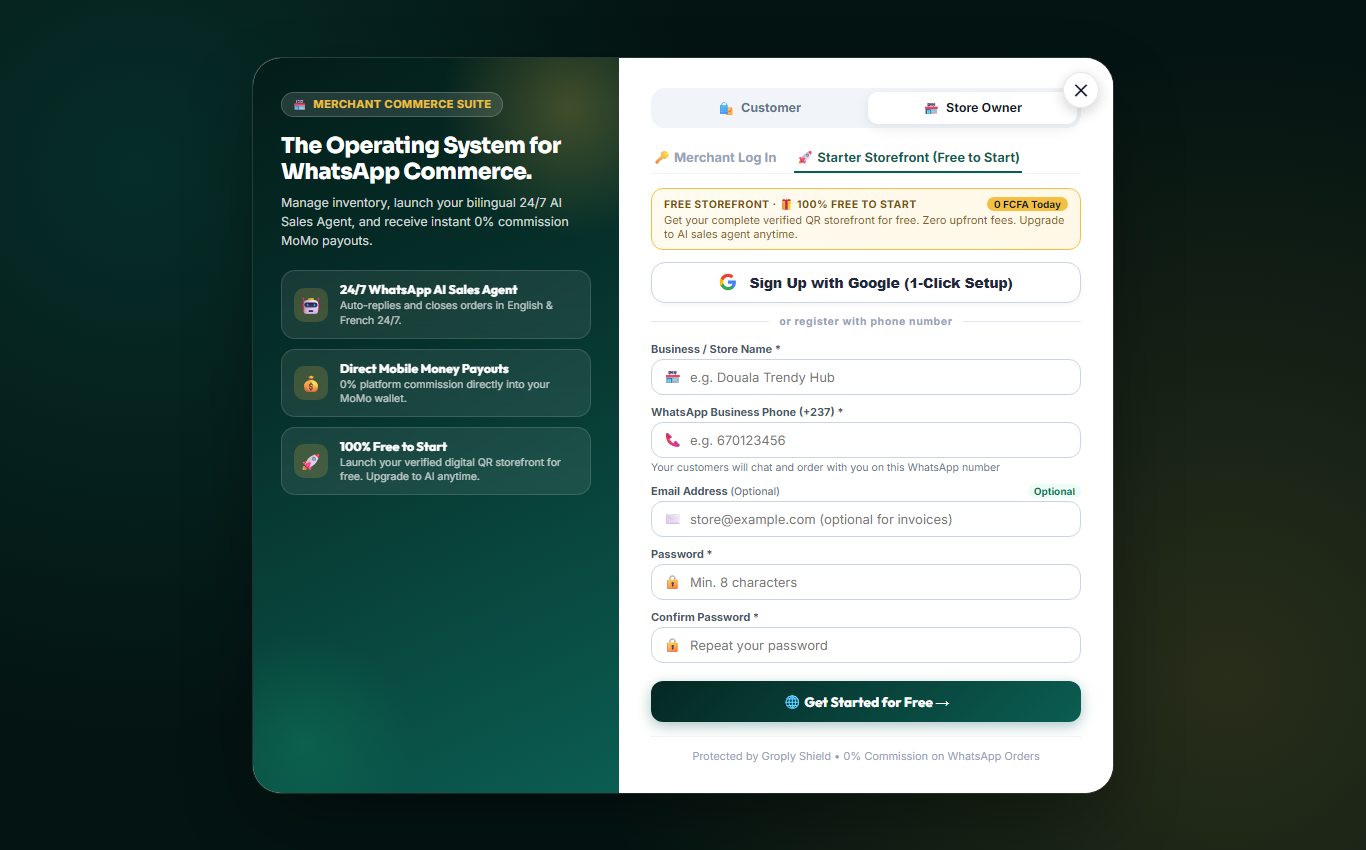
πŸš€ Fast Merchant Registration

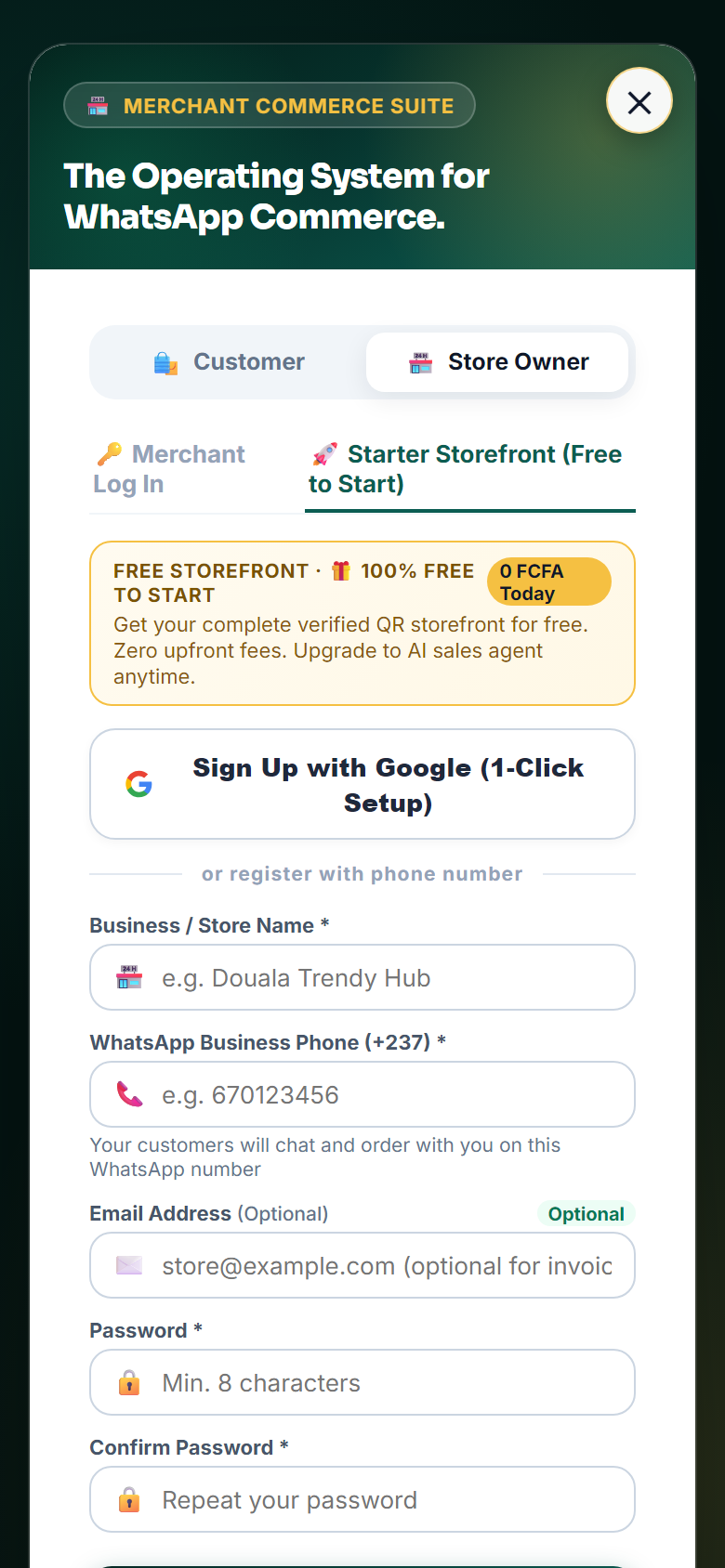
Starting a verified store on Groply takes less than 30 seconds. You can sign in with Google or use your Cameroonian phone number (MTN or Orange).

Merchant Signup Screen (Desktop View)
Figure M-1A: Sign Up at groply.shop/signup: 1-Click Google Auth or Phone Number [Desktop View]
Merchant Signup Screen (Mobile View)
Figure M-1A: Sign Up at groply.shop/signup: 1-Click Google Auth or Phone Number [Mobile Screen]
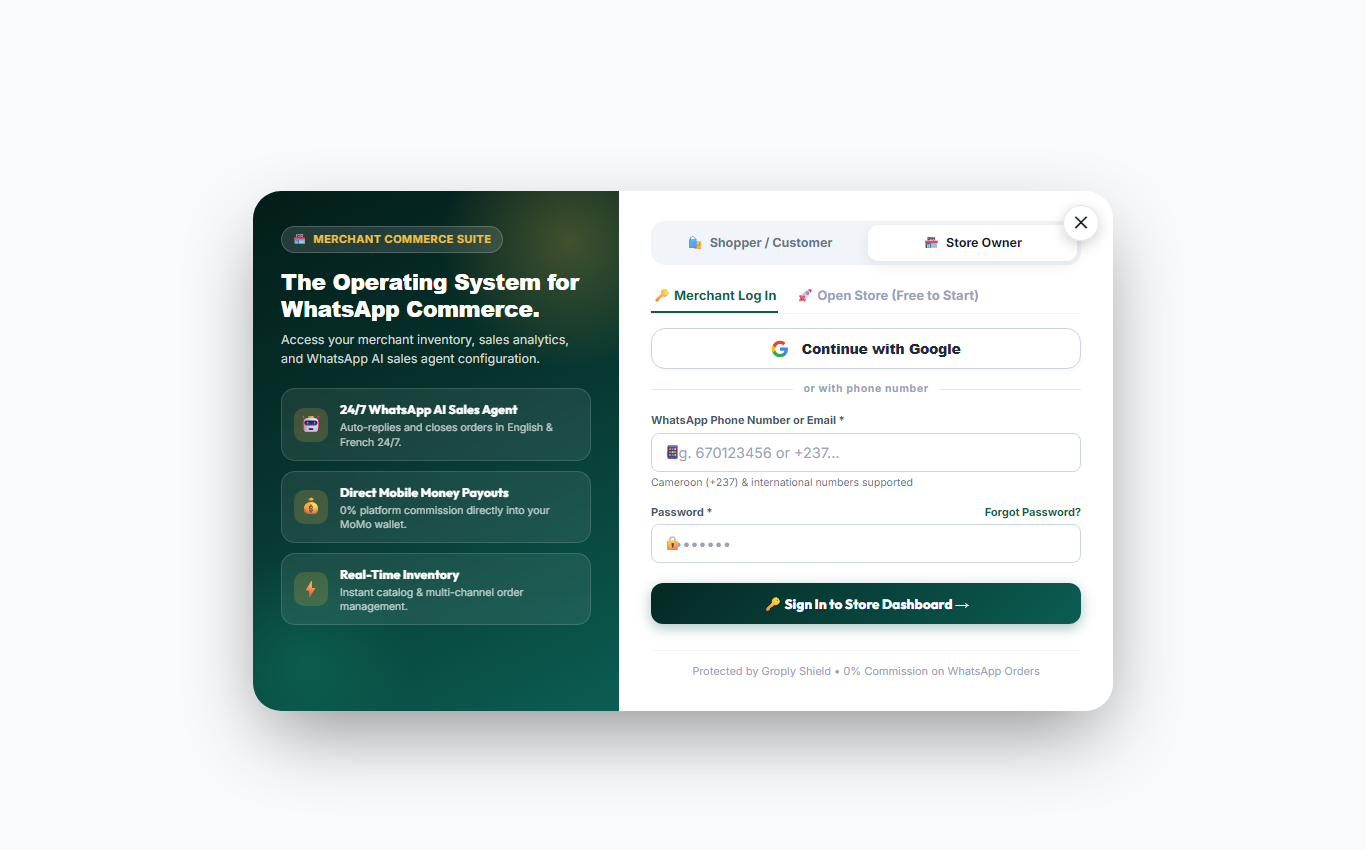
Merchant Login Screen (Desktop View)
Figure M-1B: Merchant Login at groply.shop/dashboard/login: Easy store access [Desktop View]
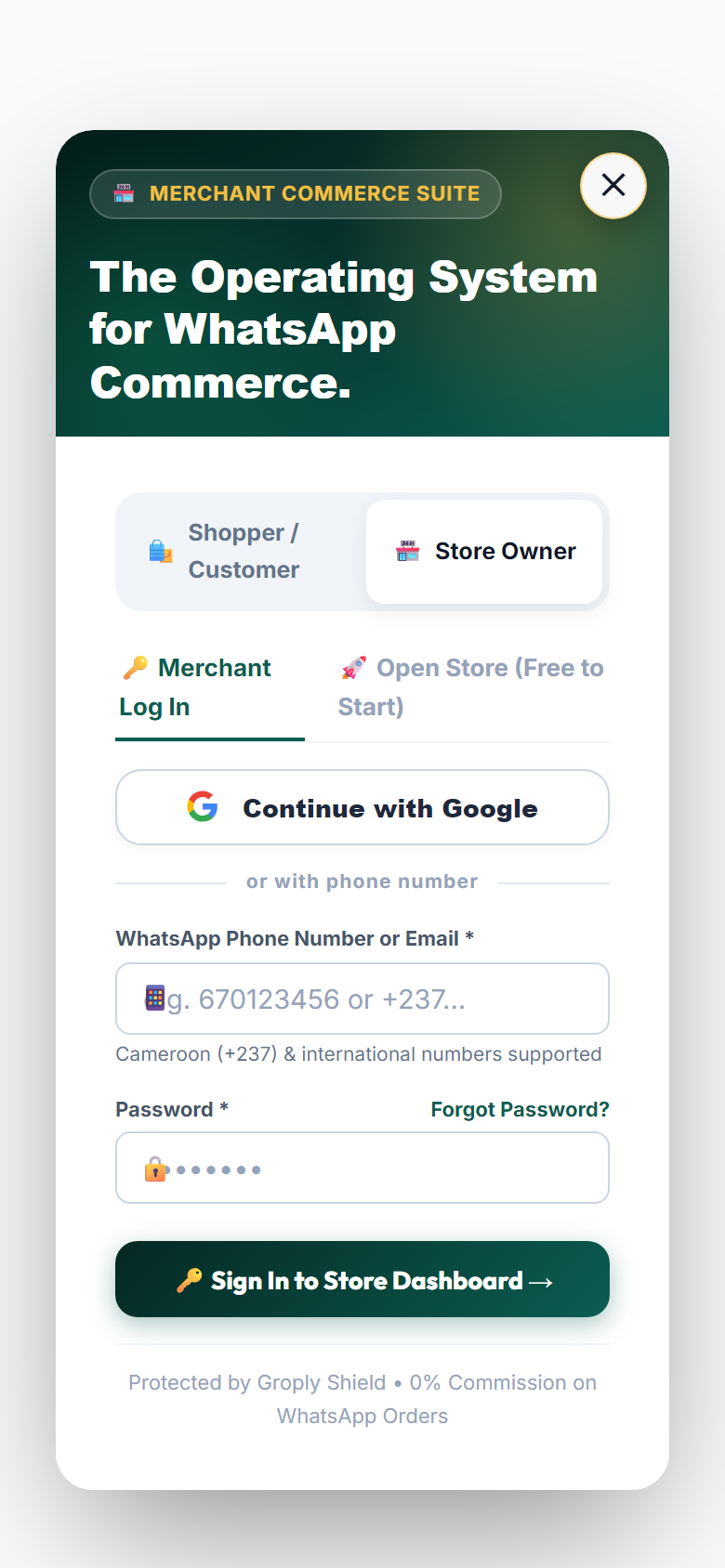
Merchant Login Screen (Mobile View)
Figure M-1B: Merchant Login at groply.shop/dashboard/login: Easy store access [Mobile Screen]

Key Registration Features

⚑

Google 1-Click Setup

Log in instantly with your Google account. No extra passwords to remember.

πŸ“±

WhatsApp Phone Number

Register directly with your business phone number to link your store profile.

πŸ›‘οΈ

Instant Store Link

Groply automatically creates your personal web link: groply.shop/store/your-store.

🎁

Free Starter Access

Zero setup fees and no credit card required to get started.

πŸͺ Merchant Milestone Β· 3 min read

Stage 2: 3-Step Business Profile & Location Setup

Set your shop city across Cameroon's 10 regions, add your MoMo details, and pick your AI sales tone.

Screenshots:
πŸ“ Quick 3-Step Setup Wizard

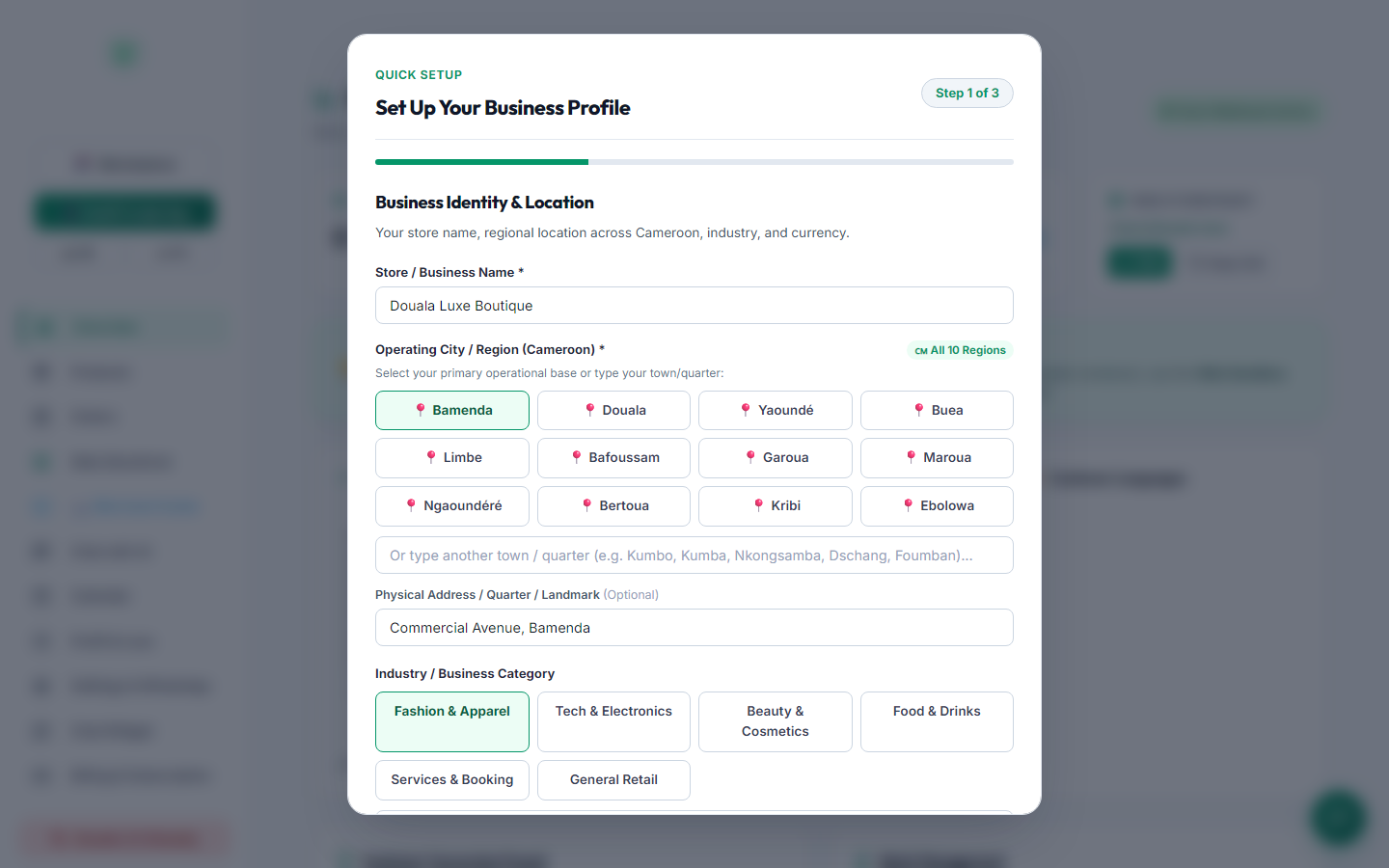
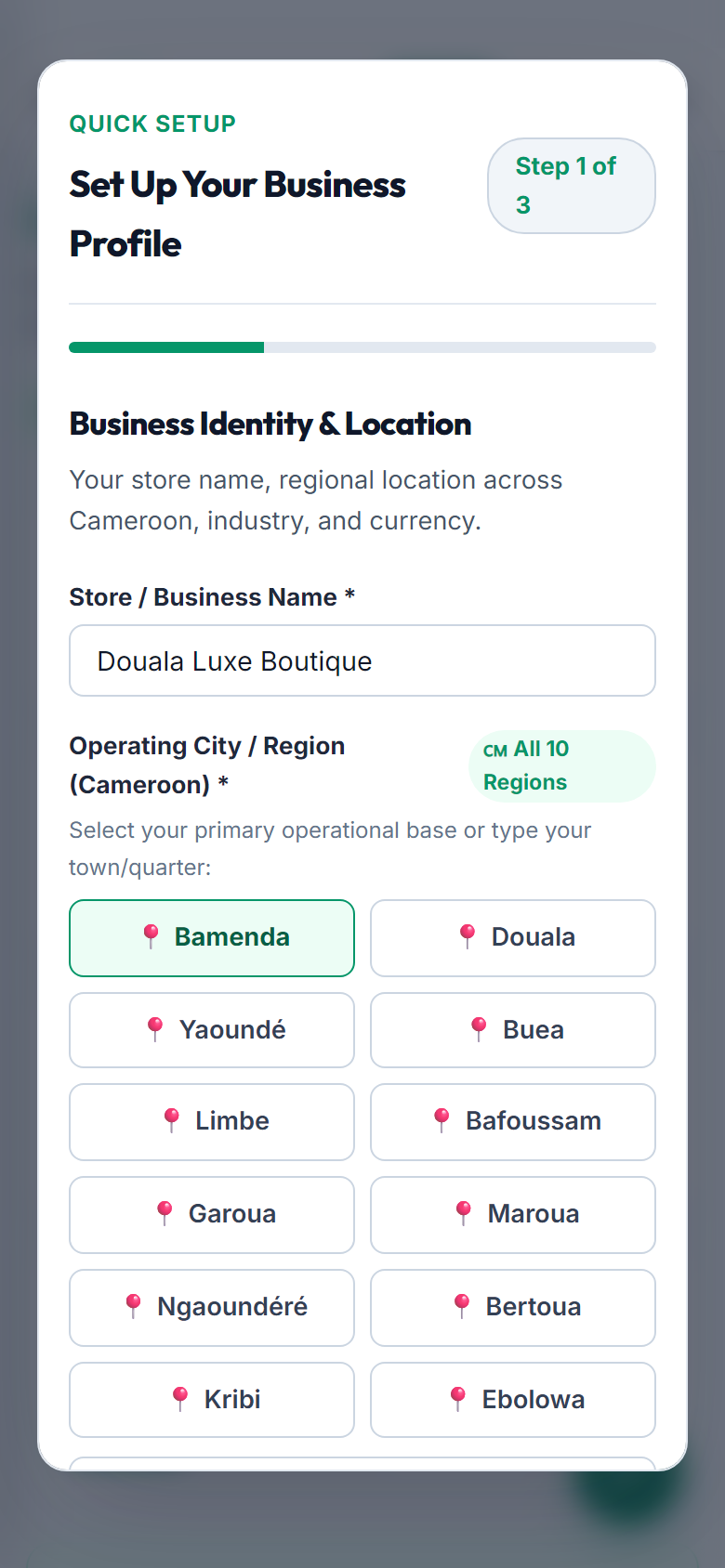
Set your exact business details in Cameroon. Whether your shop is in Bamenda, Douala, YaoundΓ©, or regional towns like Kumbo, Kumba, or Dschang, Groply adapts delivery estimates and quotes for your area.

Onboarding Step 1: Location Setup (Desktop View)
Figure M-2A: Step 1 Location: Select Bamenda or your home region, enter custom town, and specify street address [Desktop View]
Onboarding Step 1: Location Setup (Mobile View)
Figure M-2A: Step 1 Location: Select Bamenda or your home region, enter custom town, and specify street address [Mobile Screen]
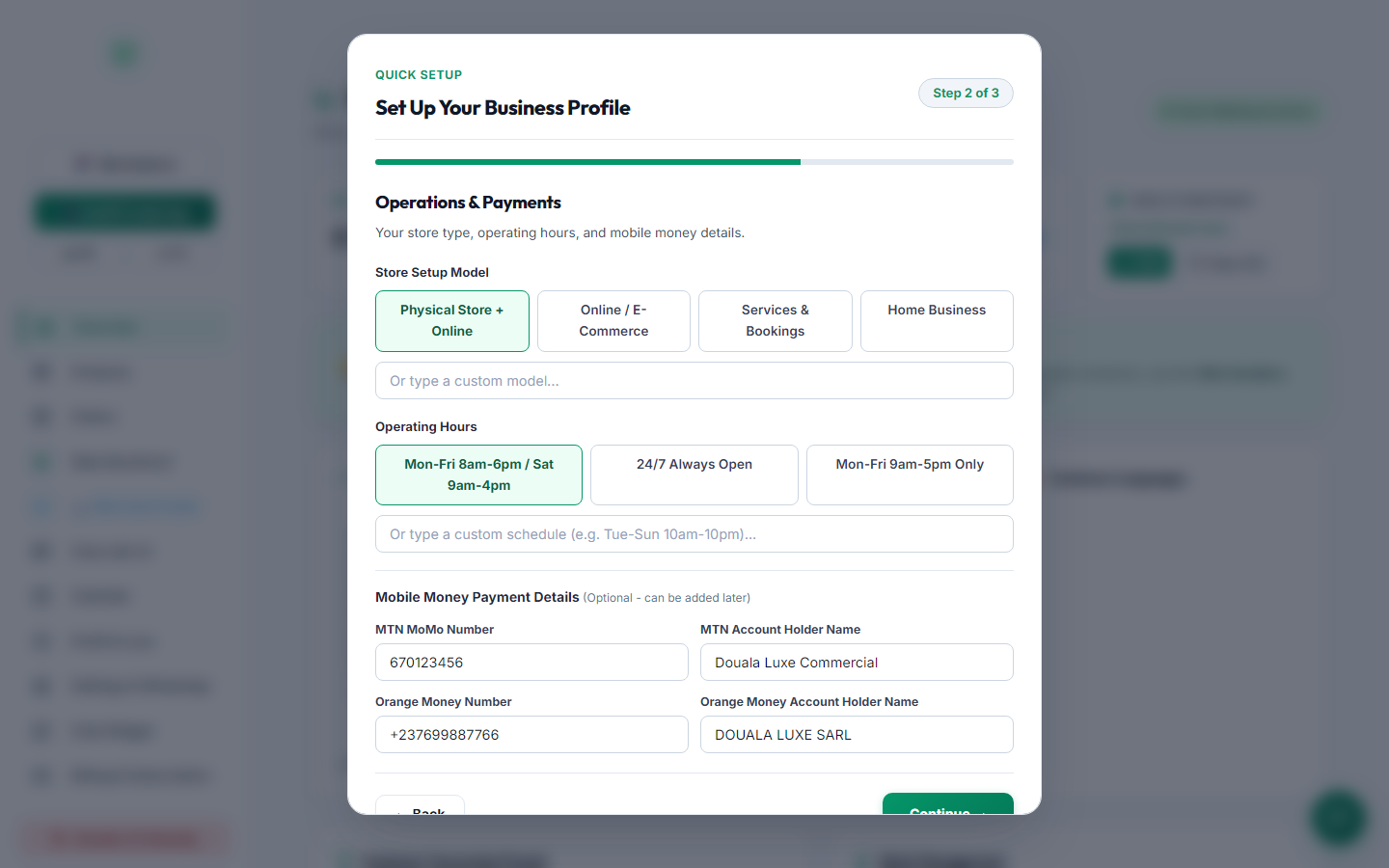
Onboarding Step 2: Payments Setup (Desktop View)
Figure M-2B: Step 2 Payments: Direct MTN MoMo / Orange Money numbers & Manual Payment Approval toggle [Desktop View]
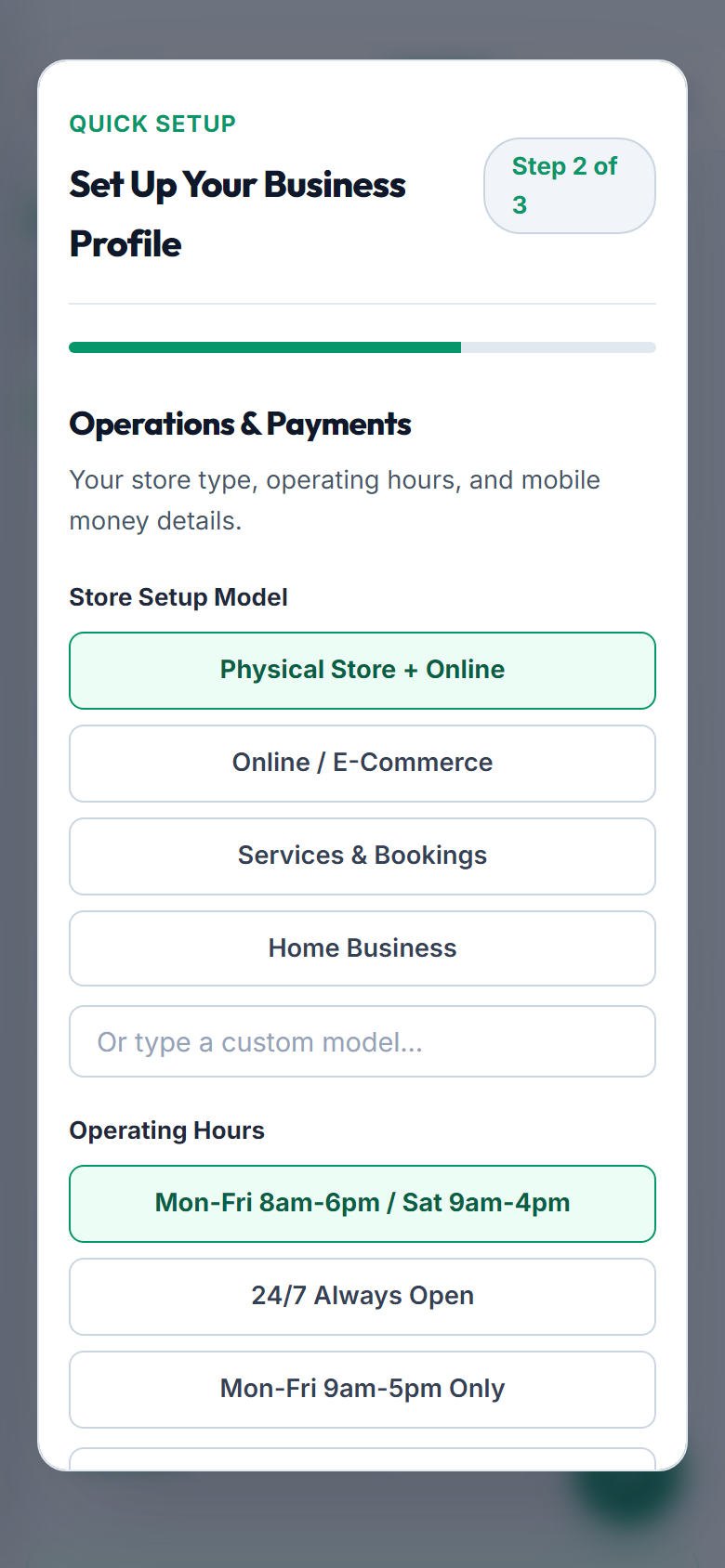
Onboarding Step 2: Payments Setup (Mobile View)
Figure M-2B: Step 2 Payments: Direct MTN MoMo / Orange Money numbers & Manual Payment Approval toggle [Mobile Screen]
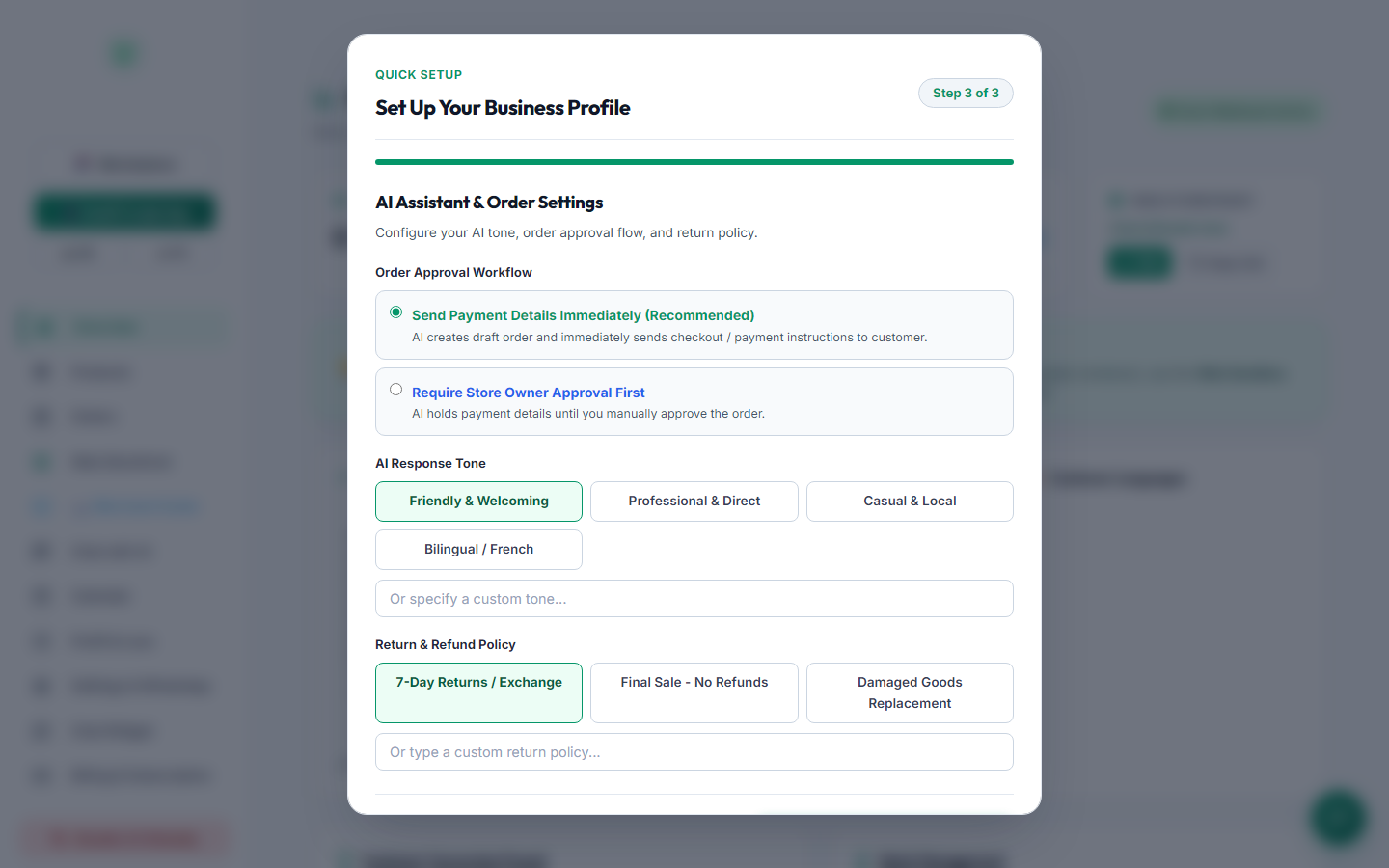
Onboarding Step 3: AI Persona (Desktop View)
Figure M-2C: Step 3 AI Tone: Choose Friendly, Professional, or Casual Local Pidgin persona [Desktop View]
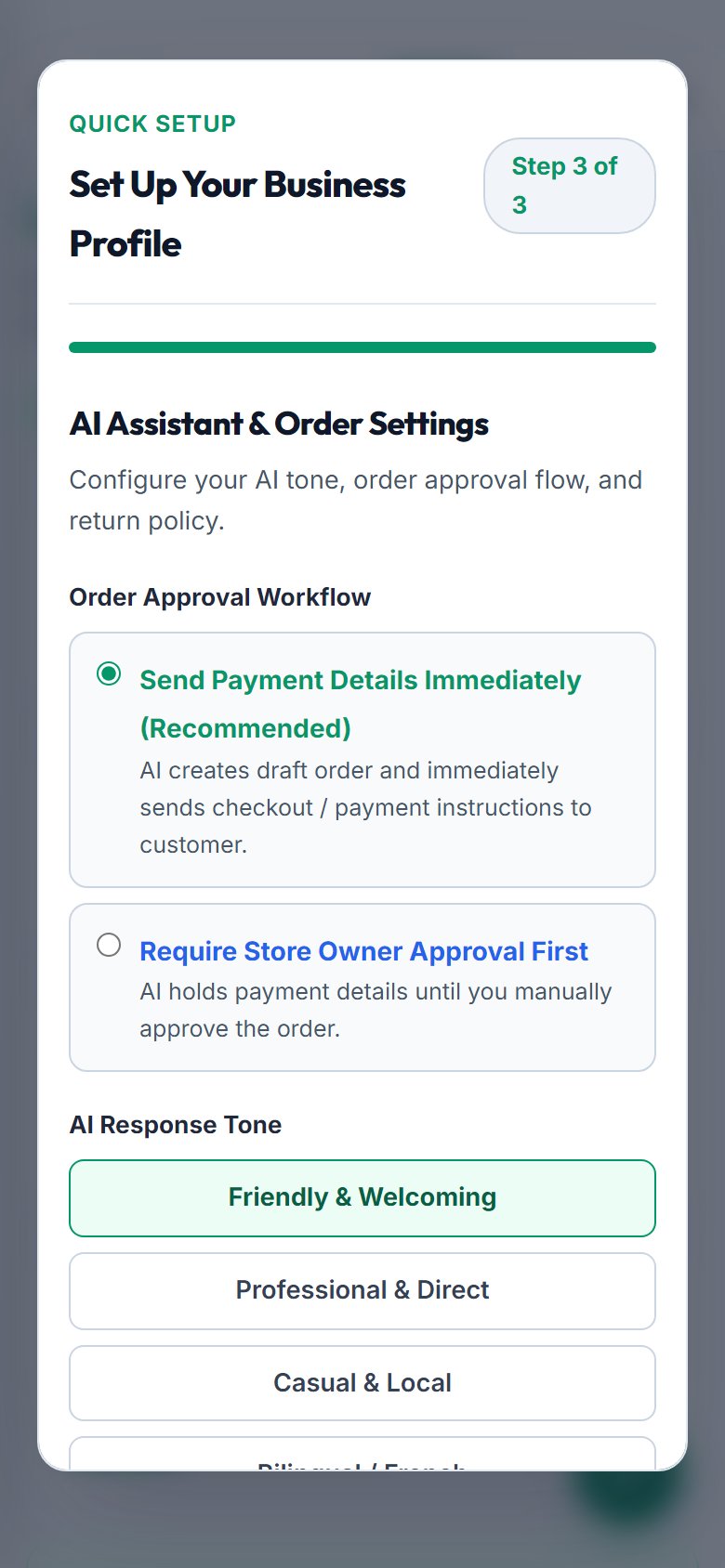
Onboarding Step 3: AI Persona (Mobile View)
Figure M-2C: Step 3 AI Tone: Choose Friendly, Professional, or Casual Local Pidgin persona [Mobile Screen]

Step-by-Step Breakdown

1
Store Name & Location Hub

Select your base city (πŸ“ Bamenda, Douala, YaoundΓ©, Buea, Limbe, Bafoussam, Garoua, etc.) or type your custom town (Kumbo, Kumba, Nkongsamba, Dschang, Foumban).

2
Physical Shop Address & Landmarks

Give clear street directions (for example: "Commercial Avenue, Opposite City Chemist, Bamenda") so local shoppers can easily visit your shop in person.

3
Direct Mobile Money Payments

Enter your MTN MoMo or Orange Money phone number and registered account name for direct customer payments with zero middleman fees.

4
AI Sales Personality & Hours

Choose how your AI talks to customers: Friendly & Welcoming, Professional, or Casual Local Pidgin, available 24/7 or during your shop hours.

πŸͺ Merchant Milestone Β· 3 min read

Stage 3: Merchant Dashboard Hub & Tab Directory

An easy guide to every tab, tool, and report inside your merchant control center.

Screenshots:
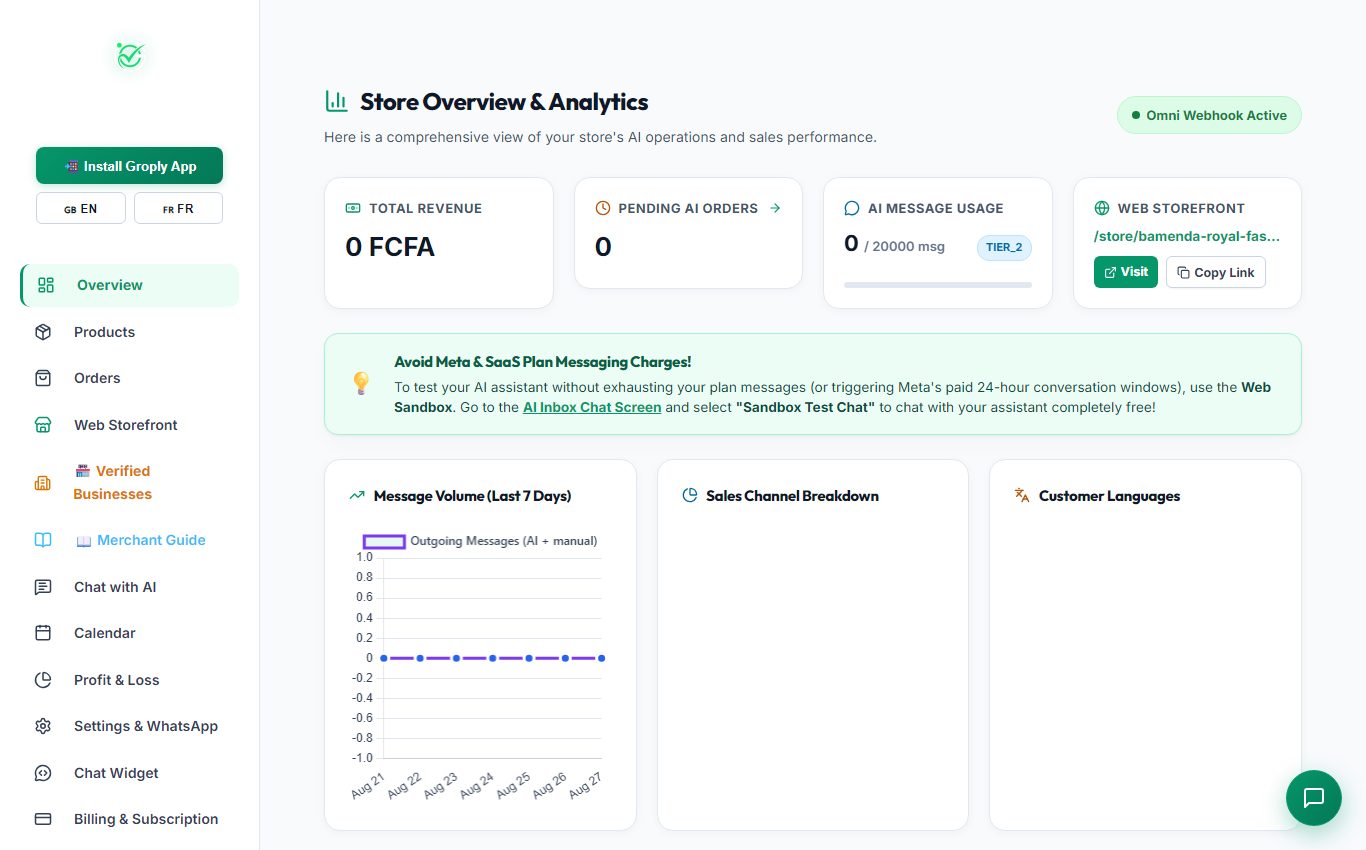
πŸ“Š Unified Merchant Control Center

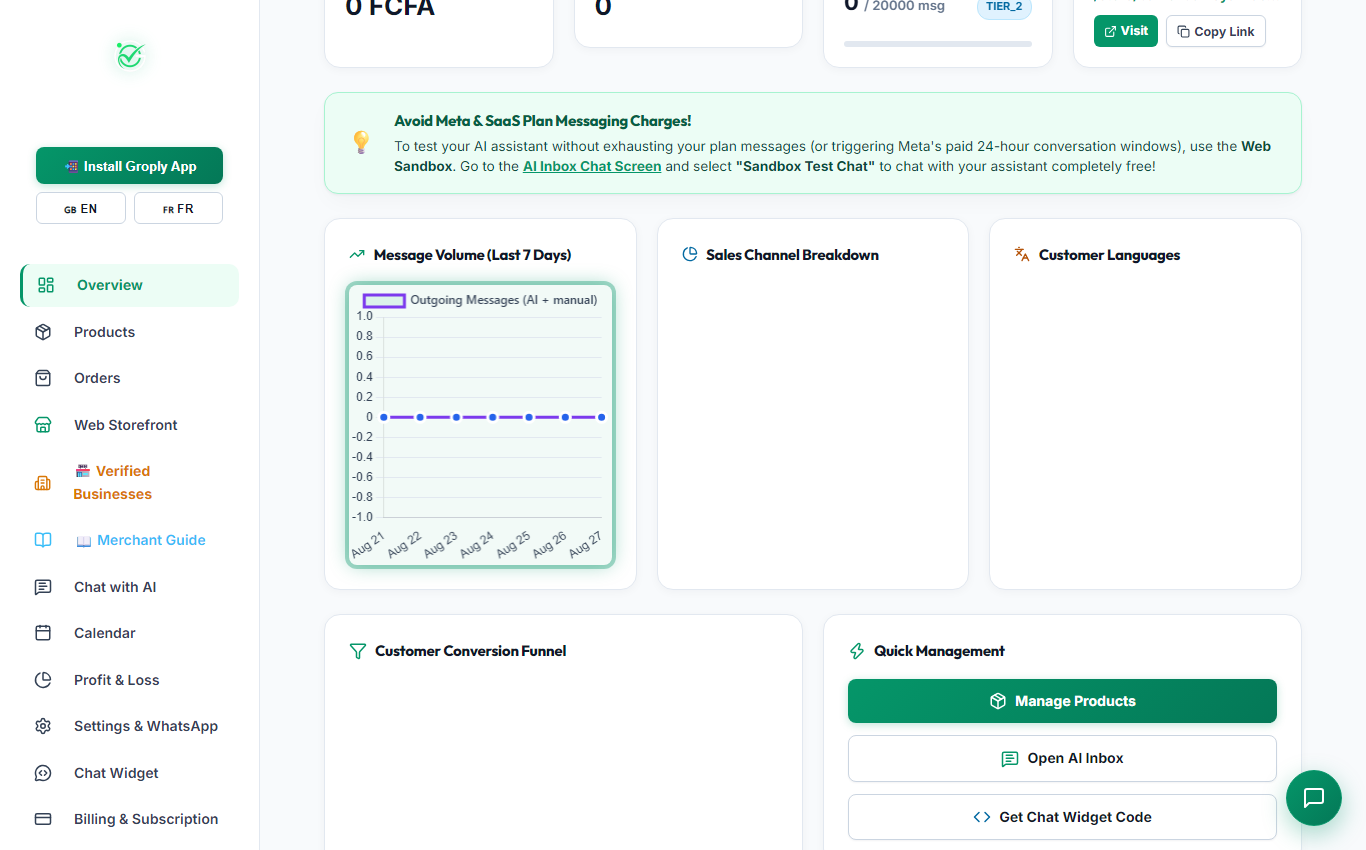
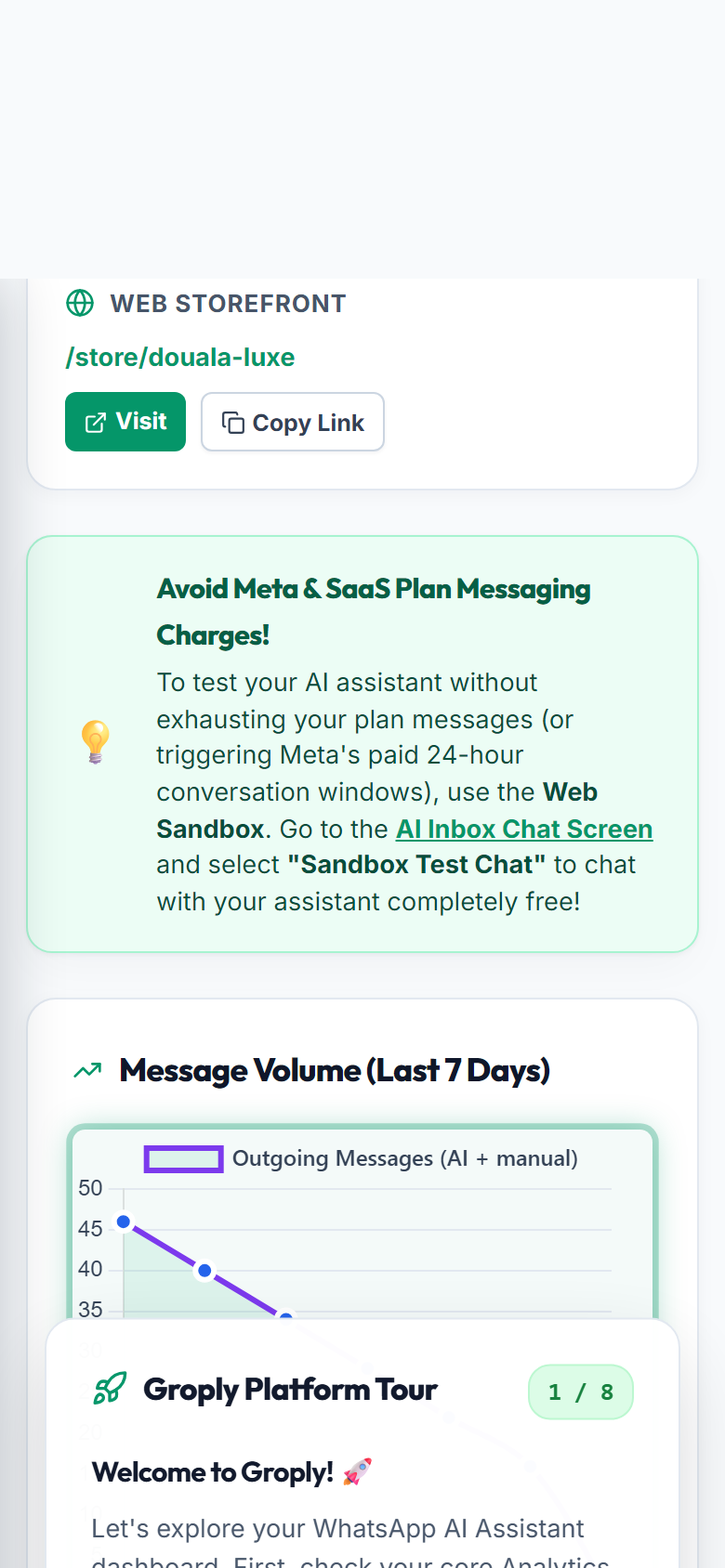
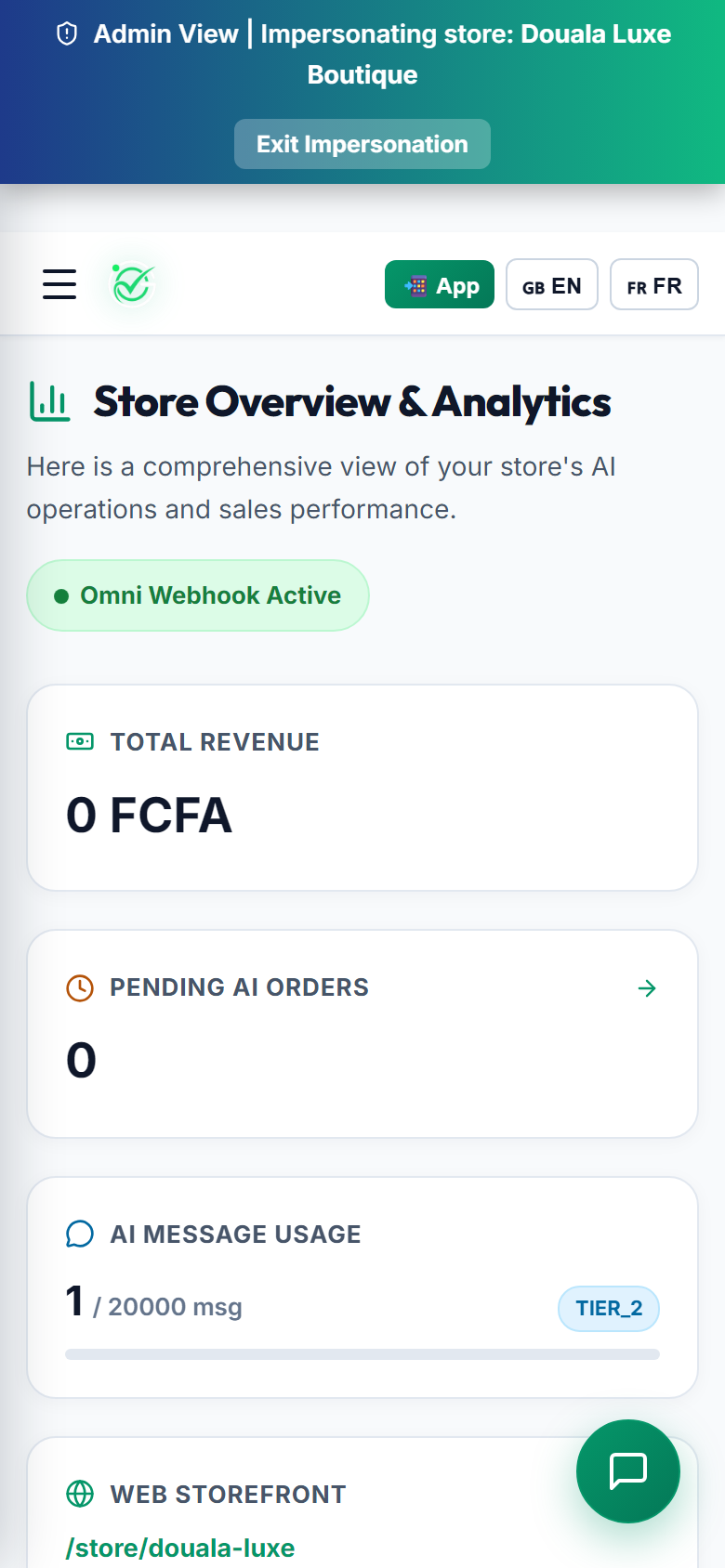
The Groply Merchant Dashboard shows your daily sales revenue, stock levels, customer messages, and pending order approvals all in one simple place.

Merchant Dashboard Overview (Desktop View)
Figure M-3: Live Dashboard Hub: Revenue metrics, recent activity, and navigation menus [Desktop View]
Merchant Dashboard Overview (Mobile View)
Figure M-3: Live Dashboard Hub: Revenue metrics, recent activity, and navigation menus [Mobile Screen]

Merchant Dashboard Tab Directory

Here is what each tab in your sidebar does:

Tab Name What It Does Link
πŸ“Š Overview See total sales in FCFA, order count, and active customer chats. View Metrics
πŸ“¦ Products Add products, set prices in FCFA, upload photos, and import CSV files. Manage Items
πŸ›’ Orders See new customer orders, buyer phone numbers, and approve MoMo payments with one click. View Orders
🏬 Web Storefront Customize your store colors, banners, and download printable QR posters. Customize Store
πŸ’¬ Chat with AI Test your AI assistant safely in a sandbox before talking to real customers. Open AI Sandbox
πŸ“… Calendar & Bookings Manage customer appointments, fittings, and reservations booked on WhatsApp. View Schedule
πŸ“ˆ Profit & Loss Track your sales, product costs, and calculate net profit margins. View Finances
βš™οΈ Settings & WhatsApp Connect your WhatsApp Business number and update business info. Open Settings
πŸ’¬ Chat Widget Add an AI chat button to any external website with a simple script tag. Get Widget Code
πŸ’³ Billing & Subscription Manage your plan, check message limits, and renew using MoMo or OM. View Plans
πŸͺ Merchant Milestone Β· 3 min read

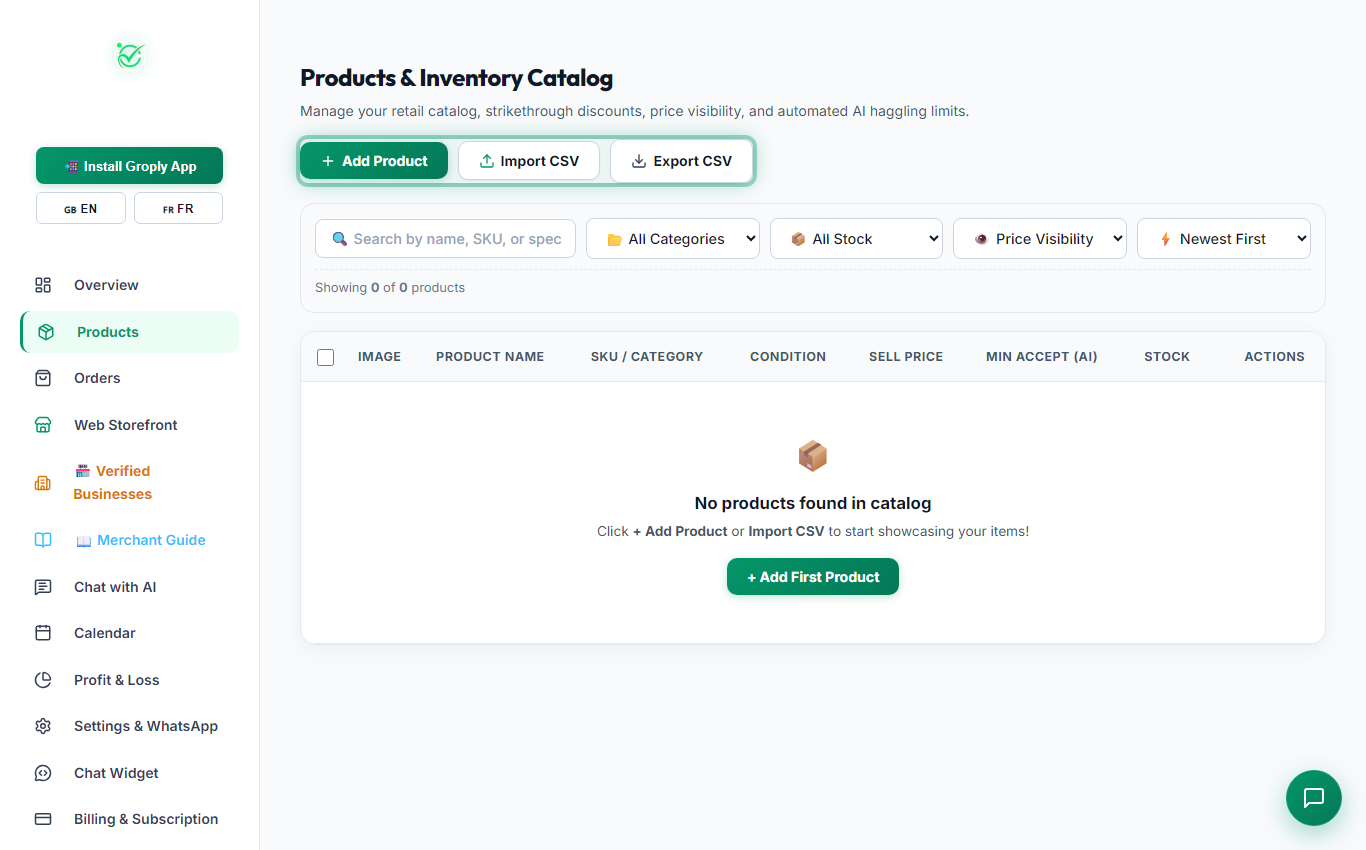
Stage 4: Products Catalog, Filters, Bulk CSV & Add Modal

Add and manage products using category filters, bulk CSV spreadsheet imports, and single uploads.

Screenshots:
πŸ“¦ Catalog & Inventory Tools

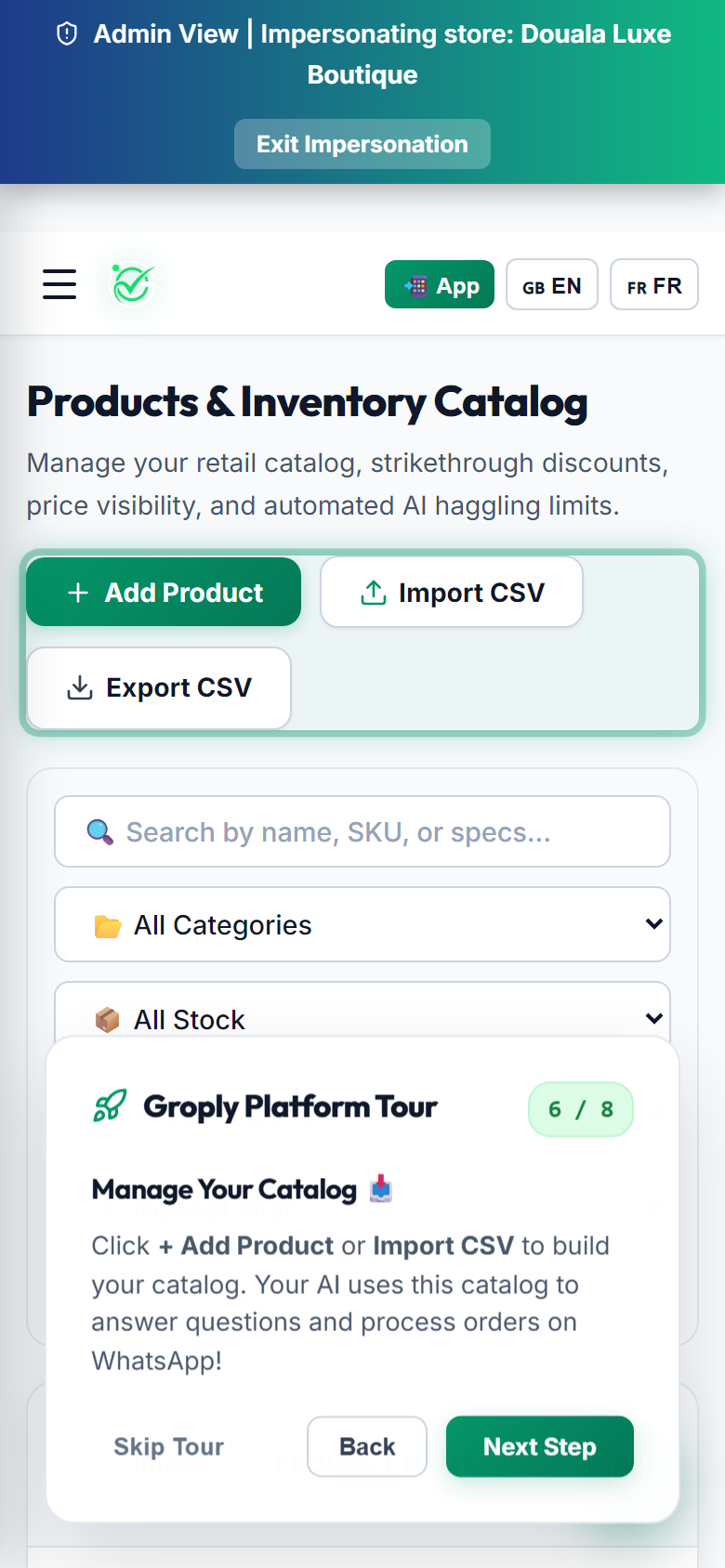
Your AI assistant uses this catalog to answer questions, share photos, and quote delivery prices. You can import many items at once using a CSV spreadsheet or add them one by one.

Products Catalog Table (Desktop View)
Figure M-4A: Products Table: Search, Category Filter, and CSV Tools [Desktop View]
Products Catalog Table (Mobile View)
Figure M-4A: Products Table: Search, Category Filter, and CSV Tools [Mobile Screen]
Add Product Modal (Desktop View)
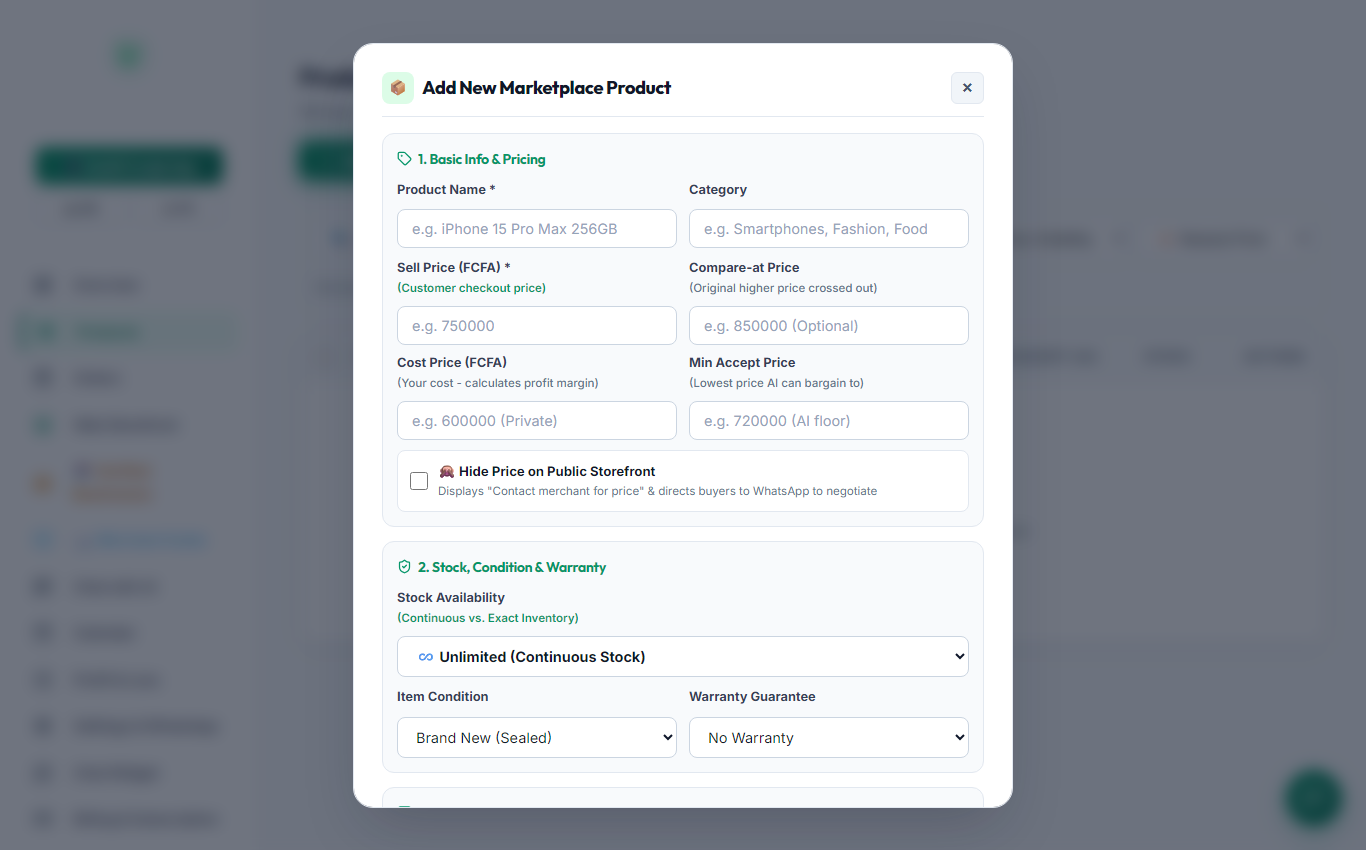
Figure M-4B: 1-by-1 Add Product Modal: Photo Upload, Price, and Stock Count [Desktop View]
Add Product Modal (Mobile View)
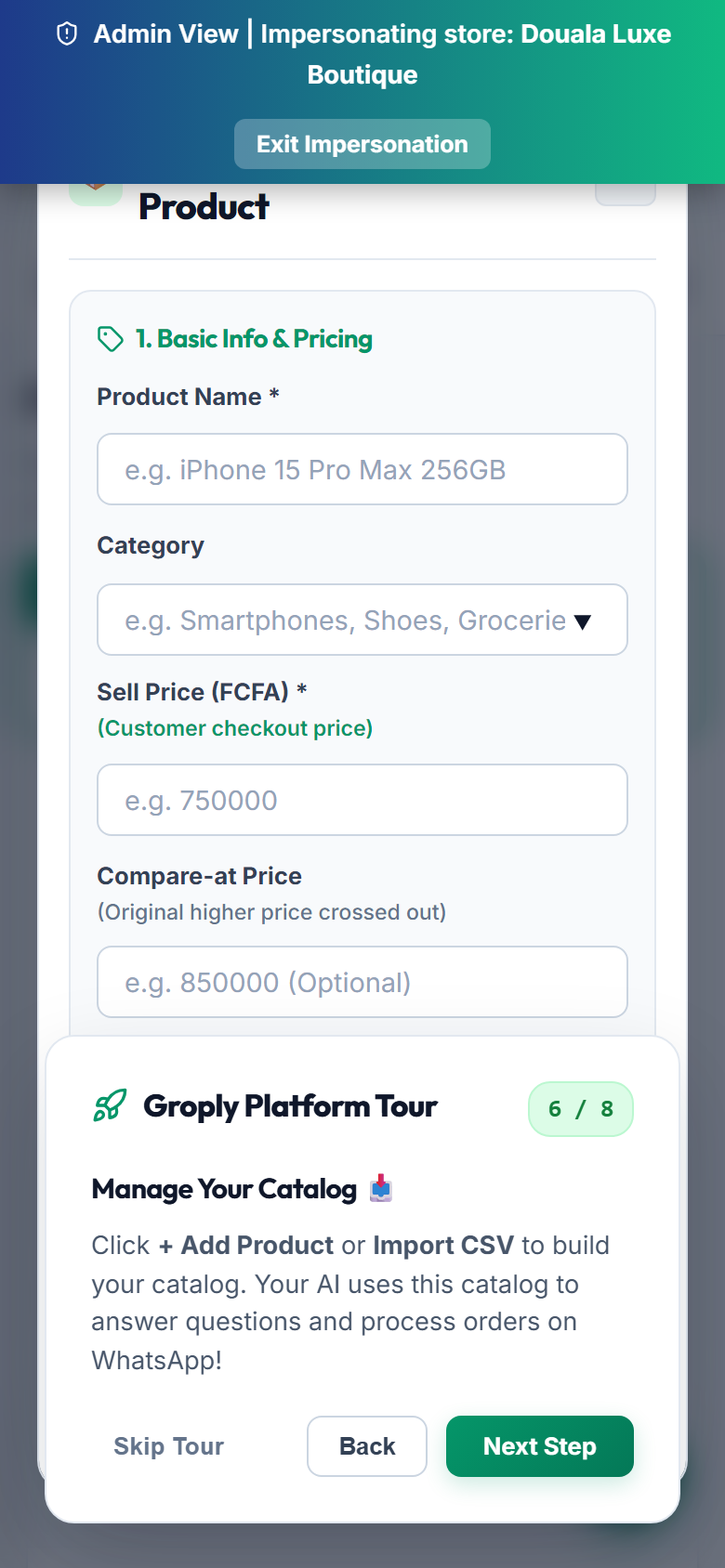
Figure M-4B: 1-by-1 Add Product Modal: Photo Upload, Price, and Stock Count [Mobile Screen]

1. Bulk CSV Upload & Export

Upload many products at once with our simple spreadsheet format:

πŸ“₯

Import CSV

Upload your file with product names, prices in FCFA, categories, and stock numbers.

πŸ“€

Export CSV

Download your entire catalog to your computer anytime for offline backups.

πŸ“₯ Download Sample CSV Template Pre-formatted spreadsheet ready for instant 1-click import into Groply.
Download CSV Template (.csv) ↓

2. Adding Products One by One

1
Product Images

Upload clear photos of your items. The AI automatically sends these photos to shoppers on WhatsApp when they ask about an item.

2
Selling Price (FCFA) & Discounts

Set your customer price. You can also enter an optional higher original price to show a strikethrough discount badge (like 30,000 FCFA 25,000 FCFA).

3
Cost Price & Minimum Acceptable Price

Keep your cost private for profit tracking. You can set a minimum floor price so your AI can give small discounts to closing buyers without losing money.

4
Hide Price Option

Check this if you want the storefront to display "Contact for price" and direct shoppers to WhatsApp for private discussions.

πŸͺ Merchant Milestone Β· 3 min read

Stage 5: Web Storefront & Printable QR Posters

Customize your public store link, brand colors, banner, and create printable QR posters for your shop.

Screenshots:
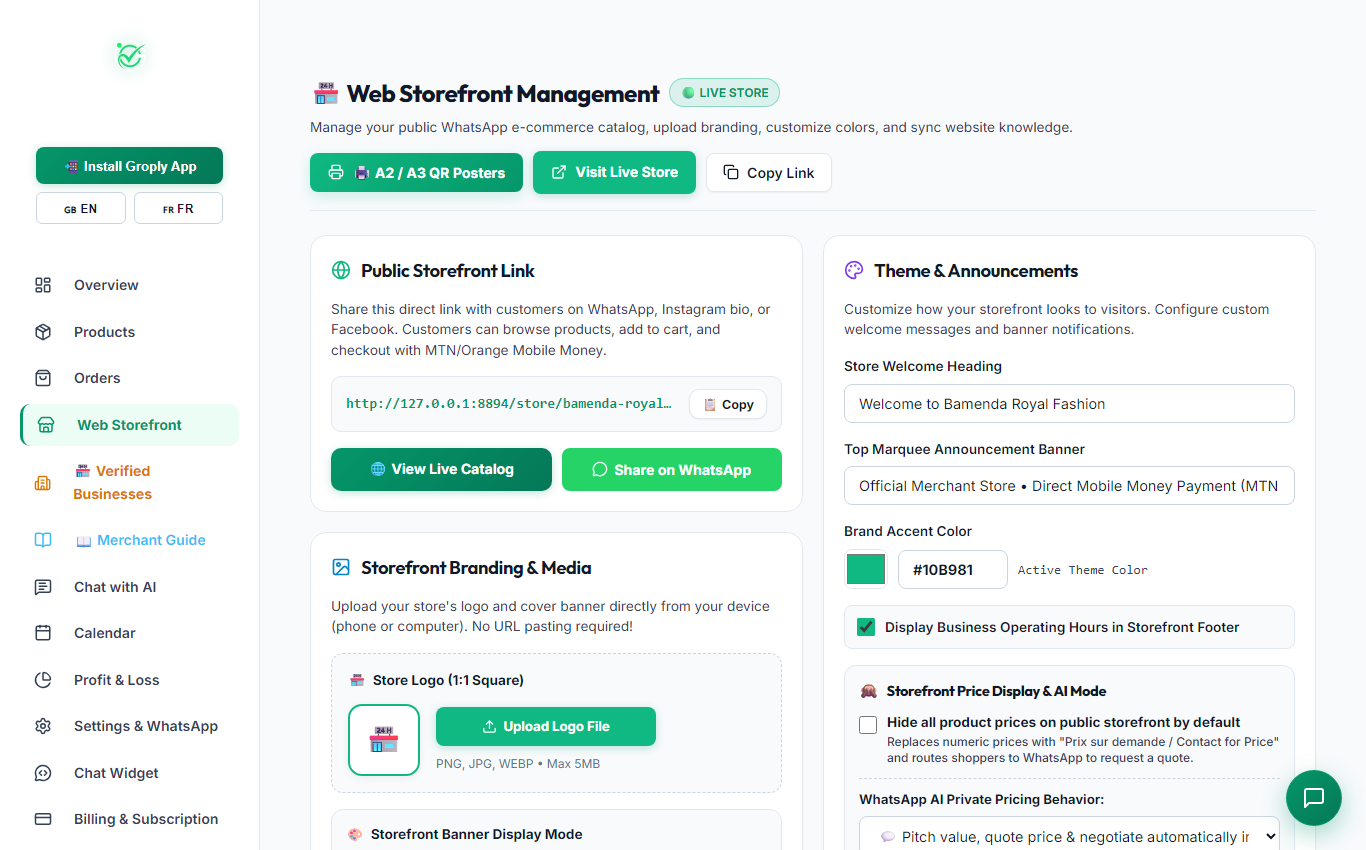
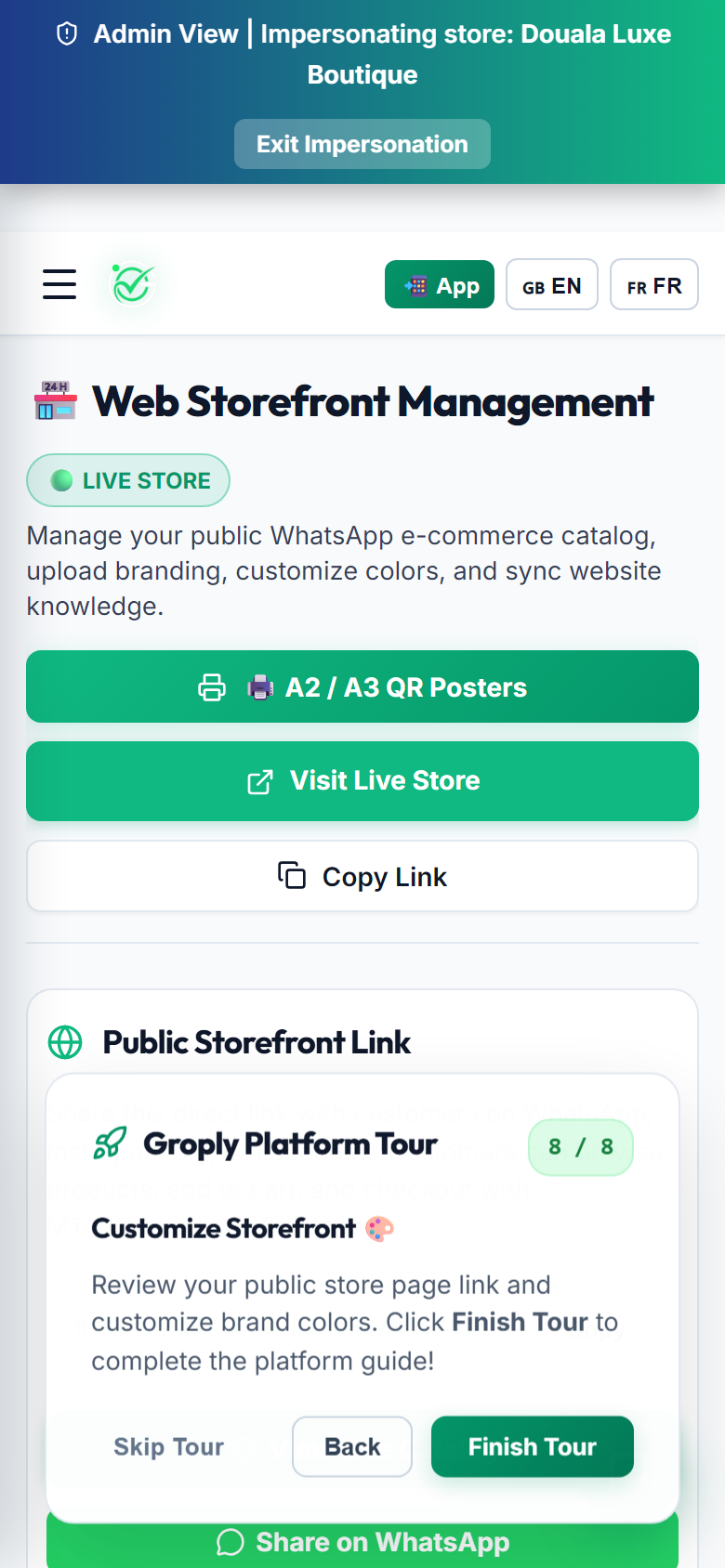
πŸͺ Digital Storefront & Shop Posters

Every store gets a clean online link at groply.shop/store/your-store-name. Share this link on your WhatsApp Status, Instagram bio, and Facebook page.

Storefront Customizer (Desktop View)
Figure M-5: Web Storefront & Poster Studio: Brand themes, banners, and vector QR poster downloads [Desktop View]
Storefront Customizer (Mobile View)
Figure M-5: Web Storefront & Poster Studio: Brand themes, banners, and vector QR poster downloads [Mobile Screen]

Key Storefront Tools

πŸ”—

Custom Store URL

Share your link anywhere. Customers can browse products and order directly on WhatsApp.

🎨

Brand Colors & Banners

Pick your favorite brand colors and upload a banner image for your store header.

πŸ–¨οΈ

Printable QR Posters

Download high-quality posters to stick on your physical shop doors and counters.

πŸ“’

Announcement Banners

Display scrolling updates (such as "Free Delivery in Bamenda today on orders over 10,000 FCFA").

πŸͺ Merchant Milestone Β· 3 min read

Stage 6: WhatsApp Business Connection & Auto-Pilot

Connect your official WhatsApp Business line while keeping your regular phone app active.

Screenshots:
⚑ Coexistence Technology

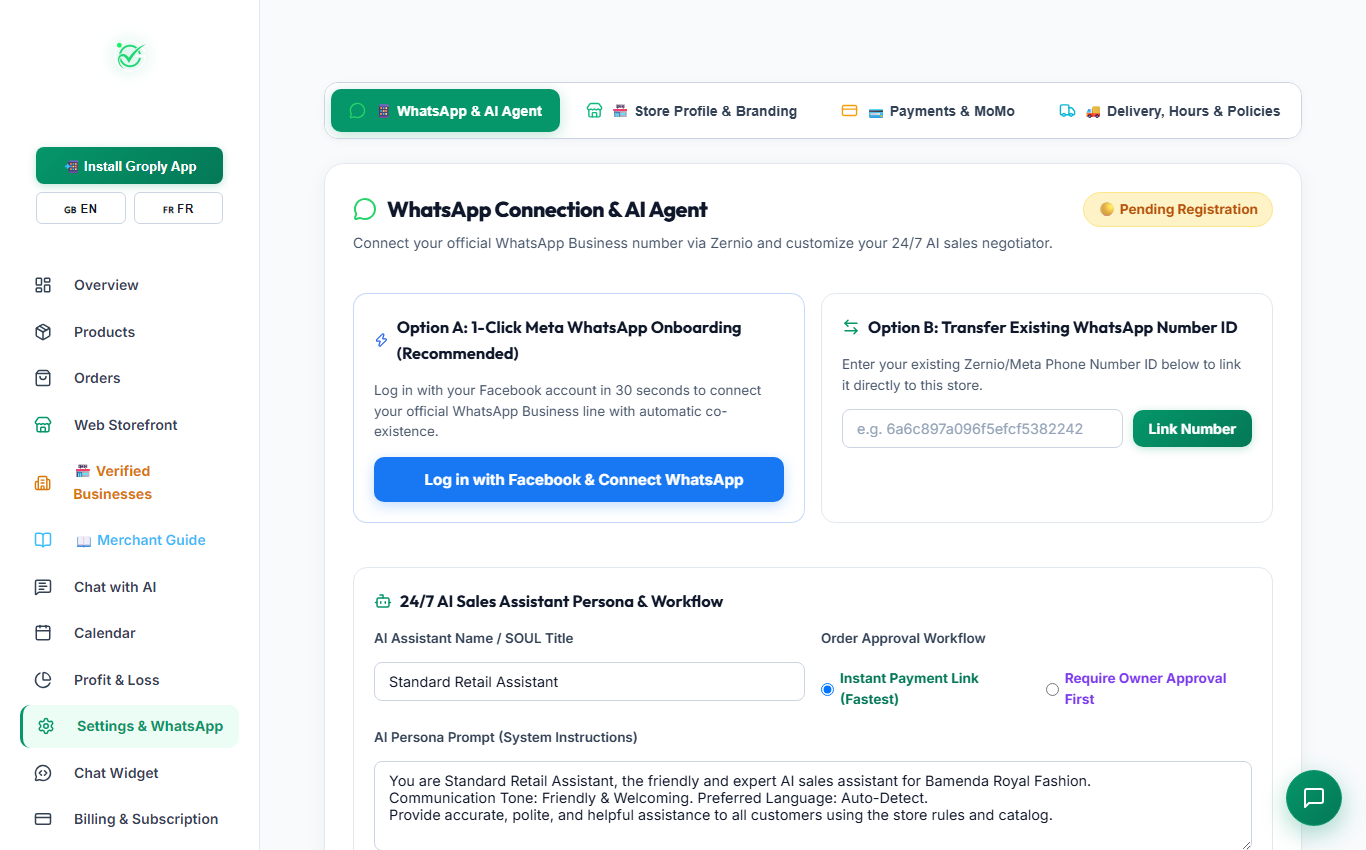
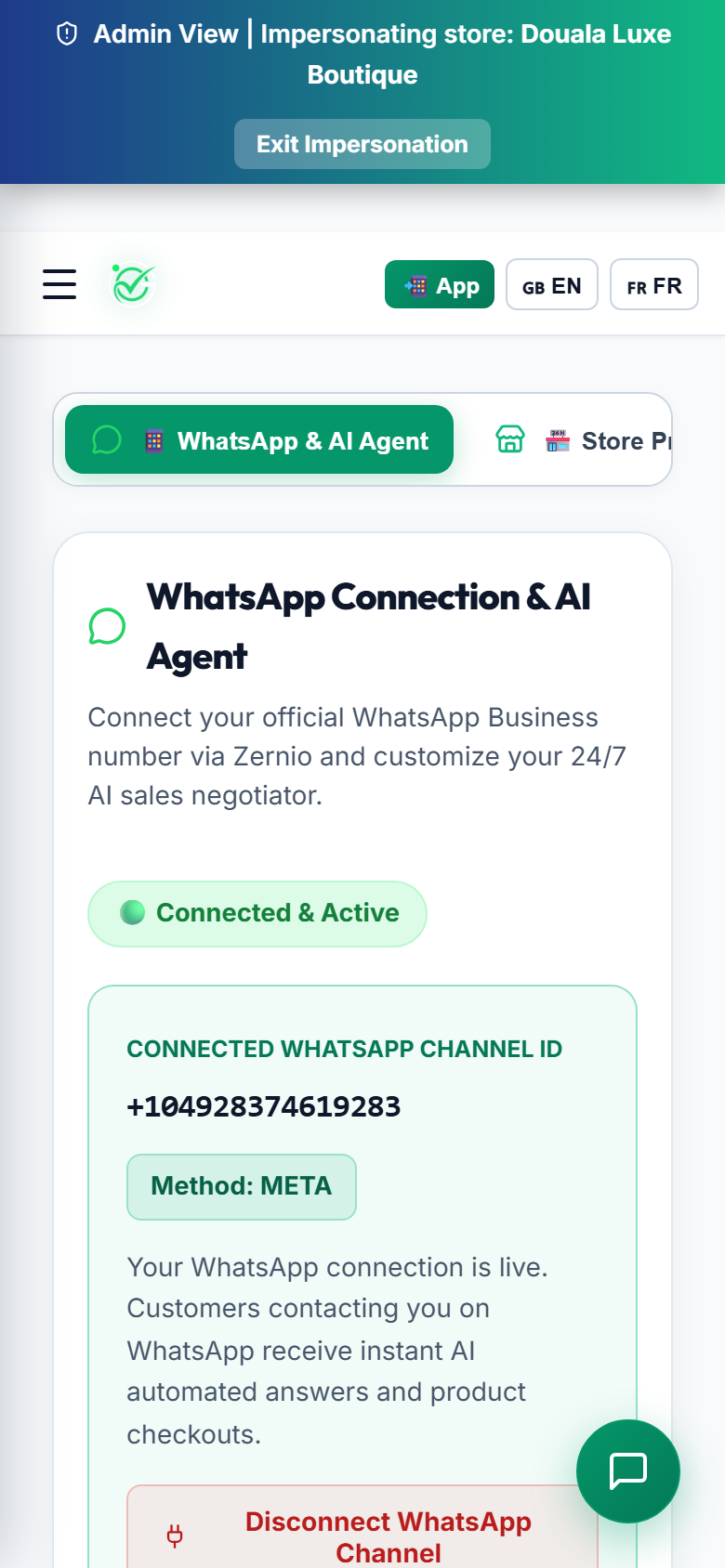
You do not need to give up your normal WhatsApp app. Groply lets the AI respond to customer inquiries instantly while allowing you to read chats and reply manually whenever you want.

WhatsApp Settings (Desktop View)
Figure M-6: WhatsApp Cloud Settings: Number connection and 24/7 AI Auto-Pilot toggle [Desktop View]
WhatsApp Settings (Mobile View)
Figure M-6: WhatsApp Cloud Settings: Number connection and 24/7 AI Auto-Pilot toggle [Mobile Screen]

How to Connect

1
Connect WhatsApp Button

Click "Connect WhatsApp" in Settings to start Meta signup or link your phone number ID.

2
Automatic Verification

Groply connects to your WhatsApp number so incoming messages are processed immediately.

3
24/7 Auto-Pilot Switch

Turn the AI switch ON so your assistant answers customer questions and collects orders day and night.

πŸͺ Merchant Milestone Β· 3 min read

Stage 7: Order Management & MoMo Verification

Track incoming WhatsApp orders, confirm MoMo transactions, and generate PDF receipts.

Screenshots:
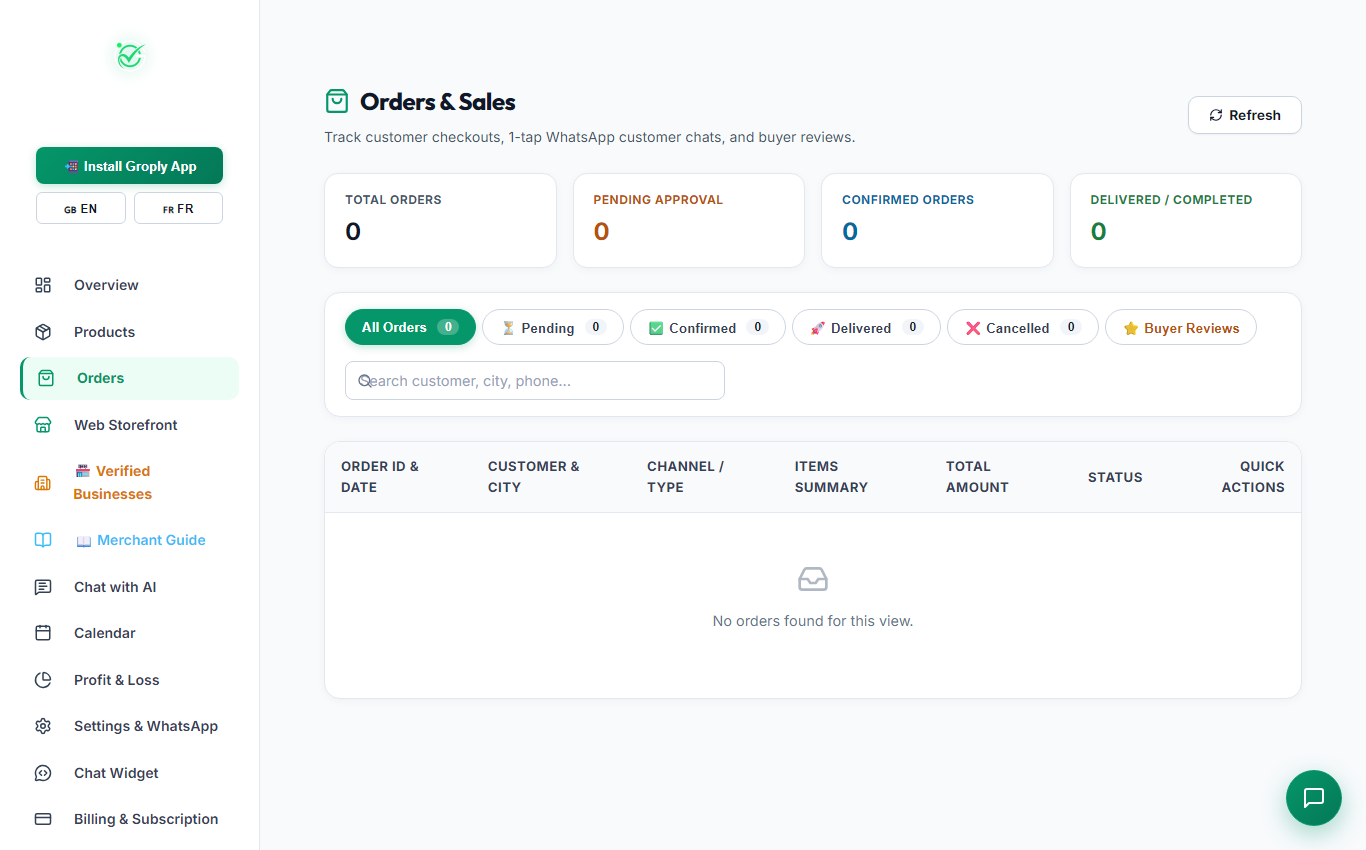
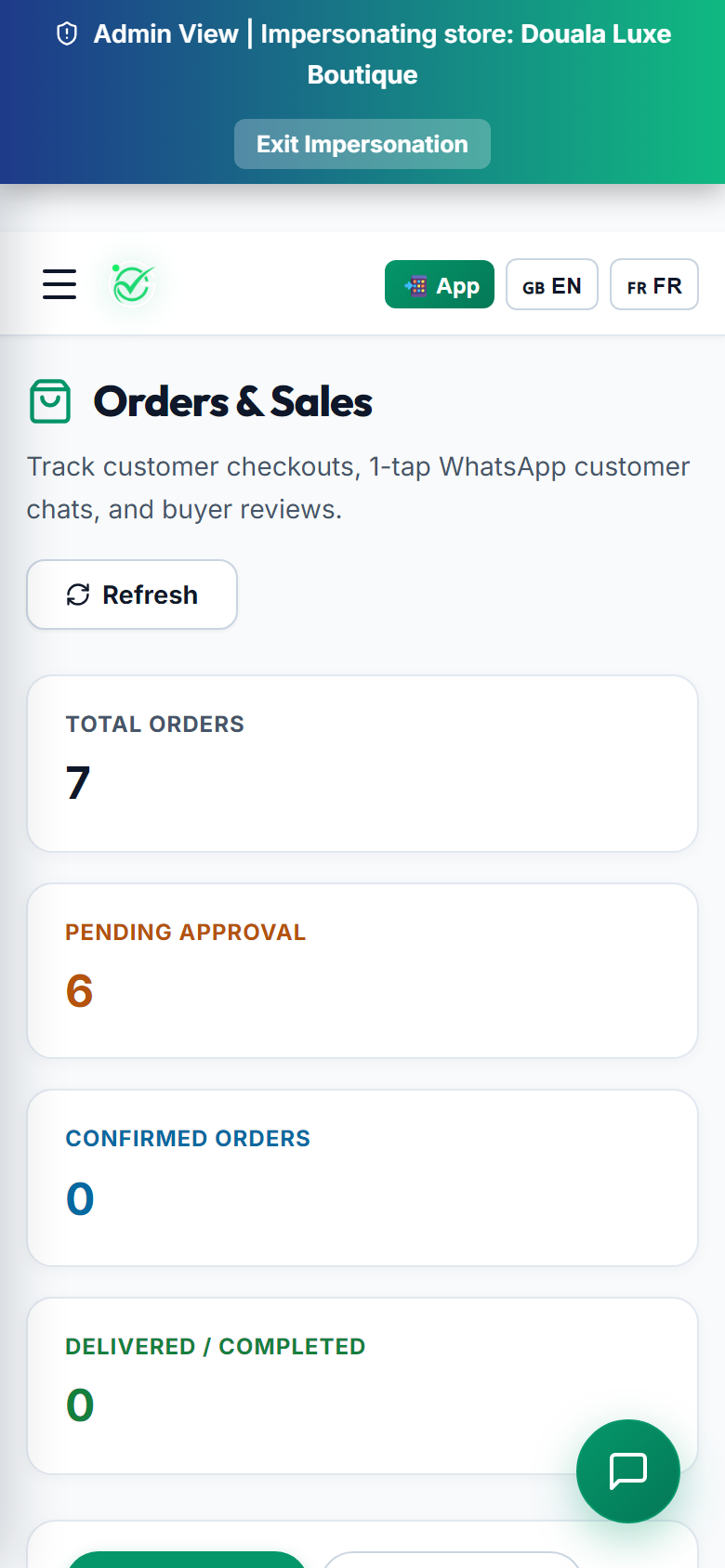
πŸ“‹ Real-Time Order Stream

Whenever a customer places an order on WhatsApp or your web store, it shows up immediately in your Orders dashboard with buyer name, phone number, and delivery town.

Orders Dashboard (Desktop View)
Figure M-7: Orders List: Filter by status, open buyer WhatsApp chats, and approve payments [Desktop View]
Orders Dashboard (Mobile View)
Figure M-7: Orders List: Filter by status, open buyer WhatsApp chats, and approve payments [Mobile Screen]

Managing Orders in 3 Steps

1
Filter by Status

Organize orders by Pending Payment, Paid / Processing, Out for Delivery, Completed, or Cancelled.

2
Click to Chat with Customer

Click on the customer's phone number to open a WhatsApp chat directly if you need to double-check their address.

3
1-Click Payment Approval

When you see the MoMo or OM confirmation SMS on your phone, click "Approve Payment". Groply automatically sends the buyer an official receipt on WhatsApp.

πŸͺ Merchant Milestone Β· 3 min read

Stage 8: Chat with AI: Sandbox Testing

Test and practice conversations with your AI assistant in a free test environment.

Screenshots:
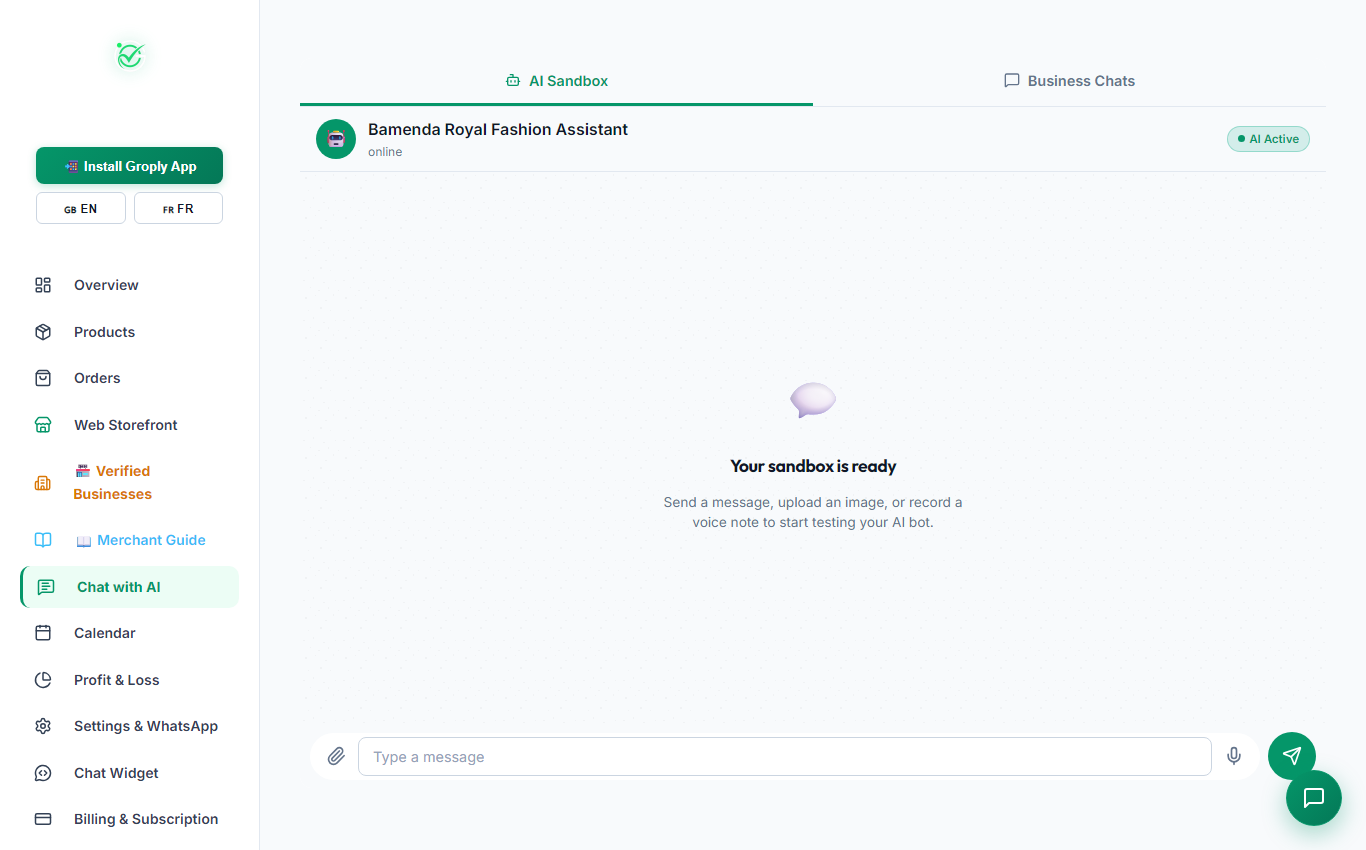
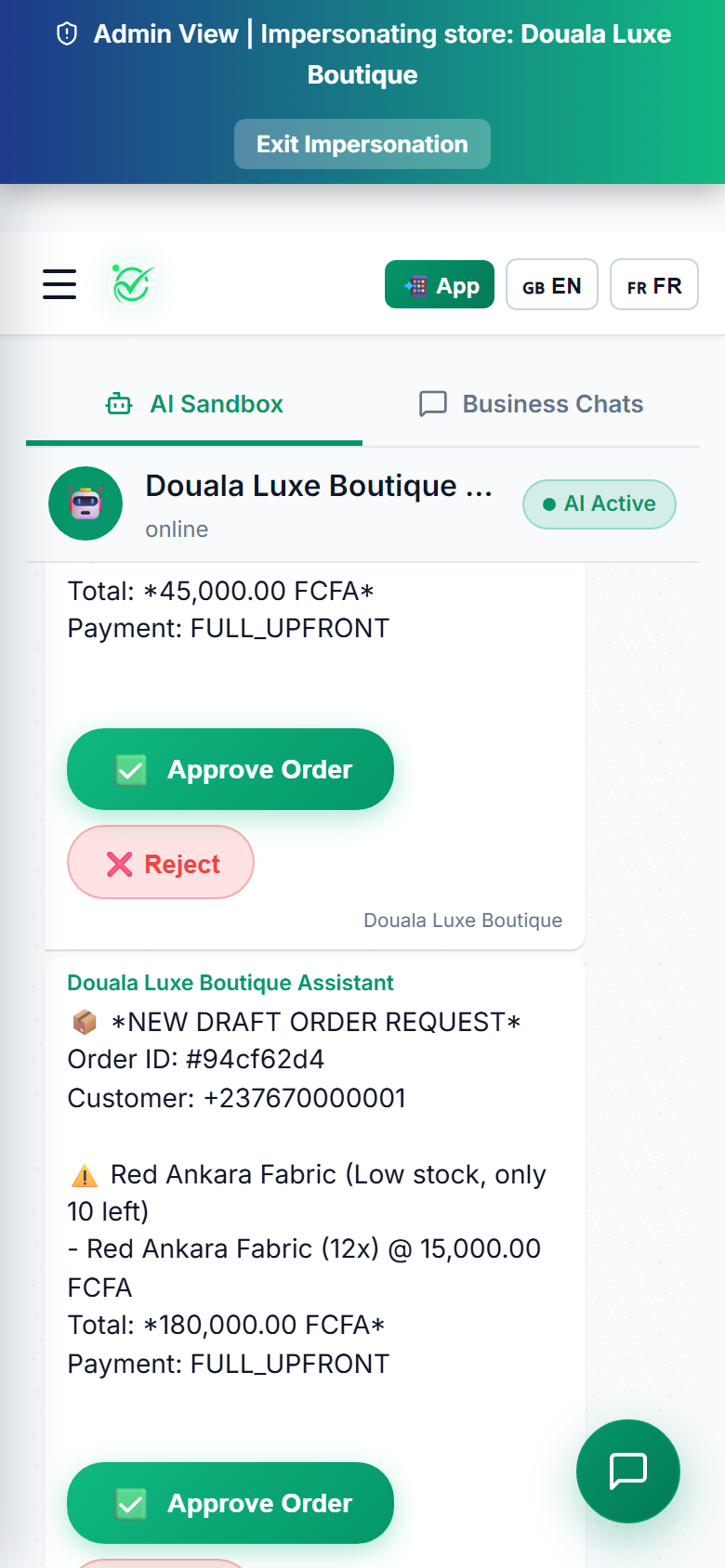
πŸ§ͺ Free AI Sandbox

The Chat with AI Sandbox lets you try out your bot before customers use it. You can test asking for prices, negotiating discounts, or checking delivery to different neighborhoods.

AI Chat Sandbox (Desktop View)
Figure M-8: Live AI Sandbox: Send test messages and check bot responses safely [Desktop View]
AI Chat Sandbox (Mobile View)
Figure M-8: Live AI Sandbox: Send test messages and check bot responses safely [Mobile Screen]

What You Can Test

πŸ’¬

Instant AI Replies

Chat directly with your store bot using the exact persona you set up.

🏷️

Bargaining Floor Test

Make sure the AI respects your minimum acceptable price and avoids giving away too much discount.

πŸ–ΌοΈ

Image & Voice Note Test

Upload photos or send audio clips to test how the bot recognizes products.

πŸ›‘οΈ

Completely Free

Sandbox chats do not count against your WhatsApp messaging limits.

πŸͺ Merchant Milestone Β· 3 min read

Stage 9: Calendar & Appointments Booking

Manage customer consultations, tailor fittings, and service bookings made through WhatsApp.

Screenshots:
πŸ“… Automated Appointment Booking

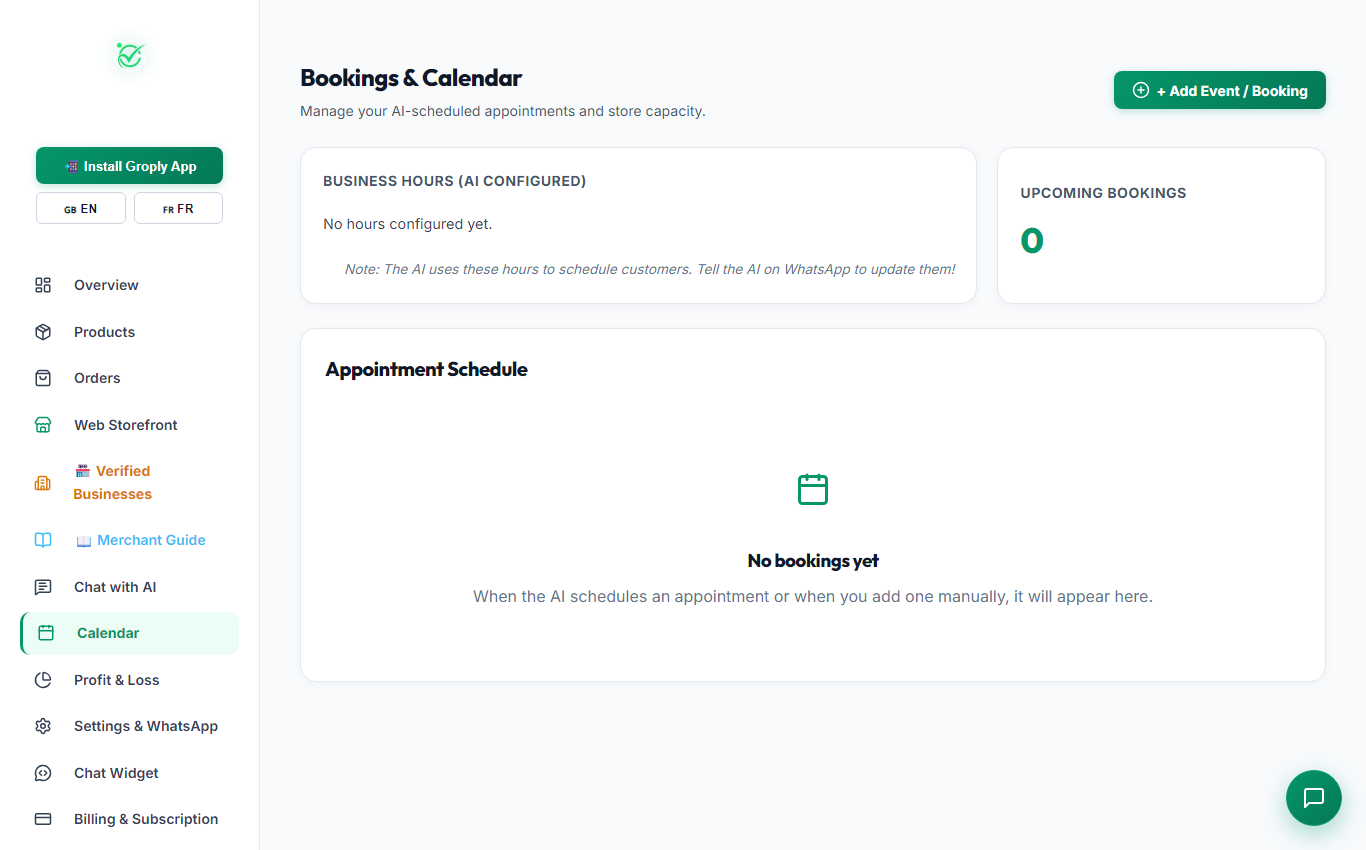
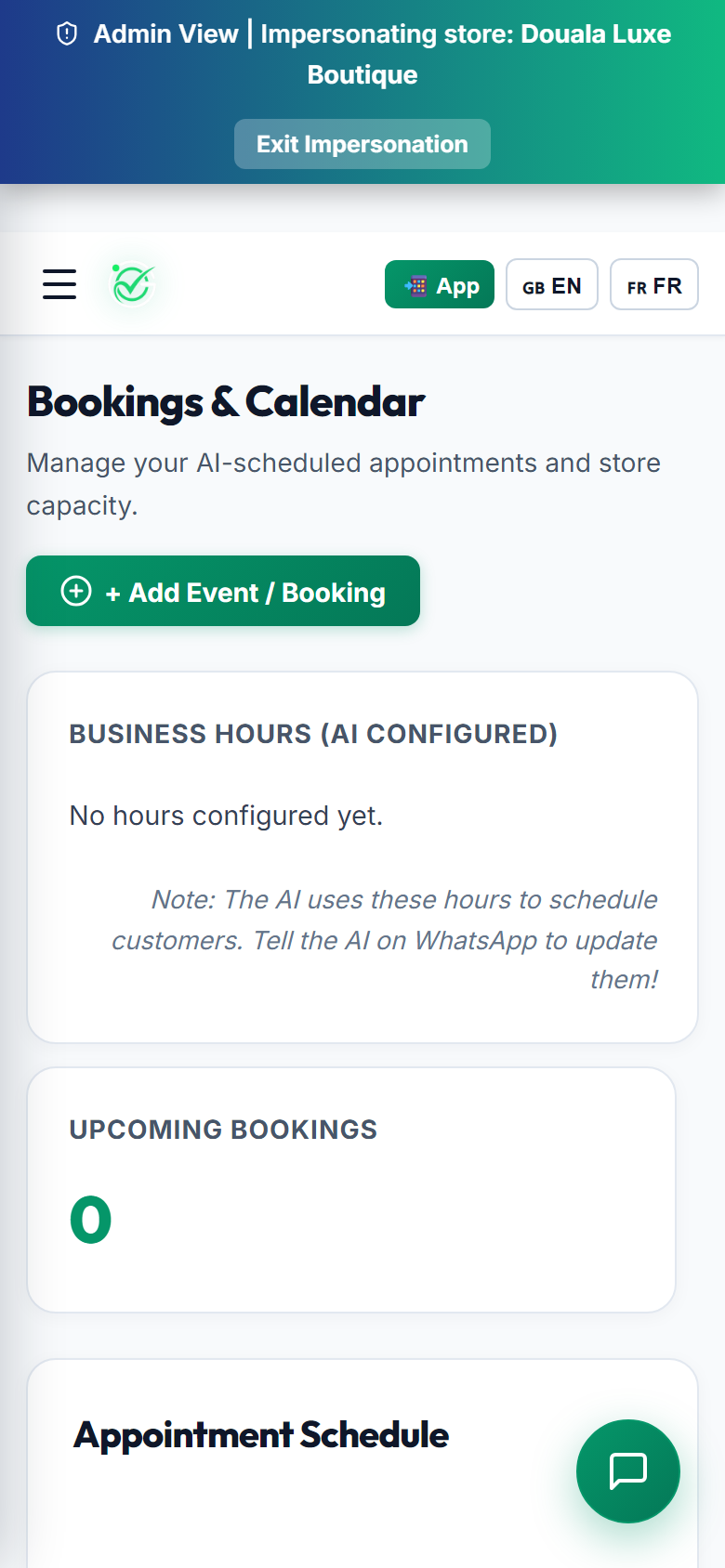
For service providers, fashion tailors, and salons, your AI assistant can check available time slots and book appointments directly for you on WhatsApp.

Calendar & Bookings (Desktop View)
Figure M-9: Bookings Management: View upcoming bookings and add manual appointments [Desktop View]
Calendar & Bookings (Mobile View)
Figure M-9: Bookings Management: View upcoming bookings and add manual appointments [Mobile Screen]

Calendar Features

1
Business Hours Sync

The AI only books appointments during your open hours (for example: Monday to Saturday, 8:00 AM to 6:00 PM).

2
Manual Booking Add

Click "+ Add Event / Booking" to add clients who walk into your shop or call you on the phone.

3
WhatsApp Confirmation

When an appointment is saved, Groply sends a confirmation message with date and location to the customer.

πŸͺ Merchant Milestone Β· 3 min read

Stage 10: Profit & Loss: Financial Analytics

Track your sales revenue in FCFA, business expenses, and take-home profit margins.

Screenshots:
πŸ“ˆ Real-Time Financial Intelligence

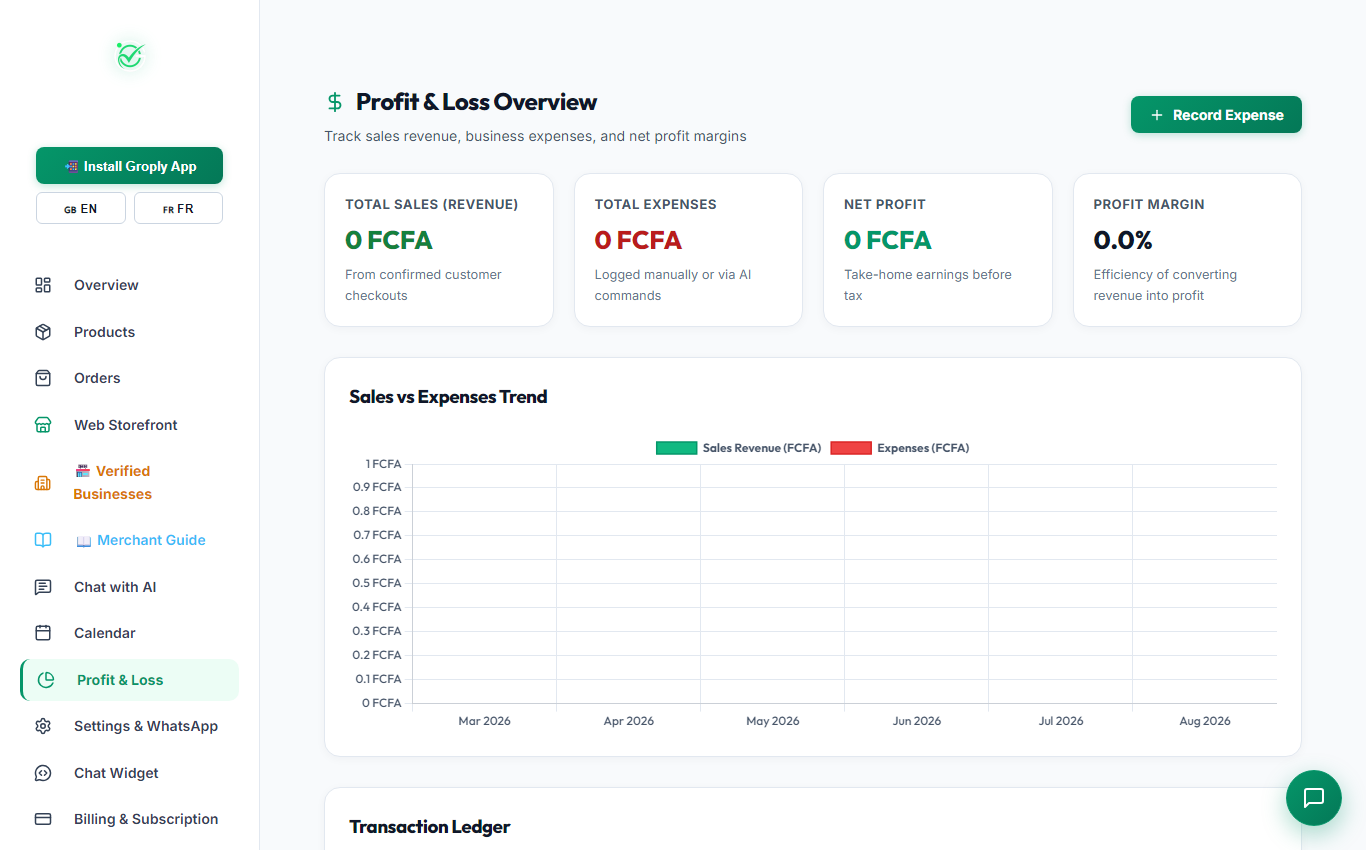
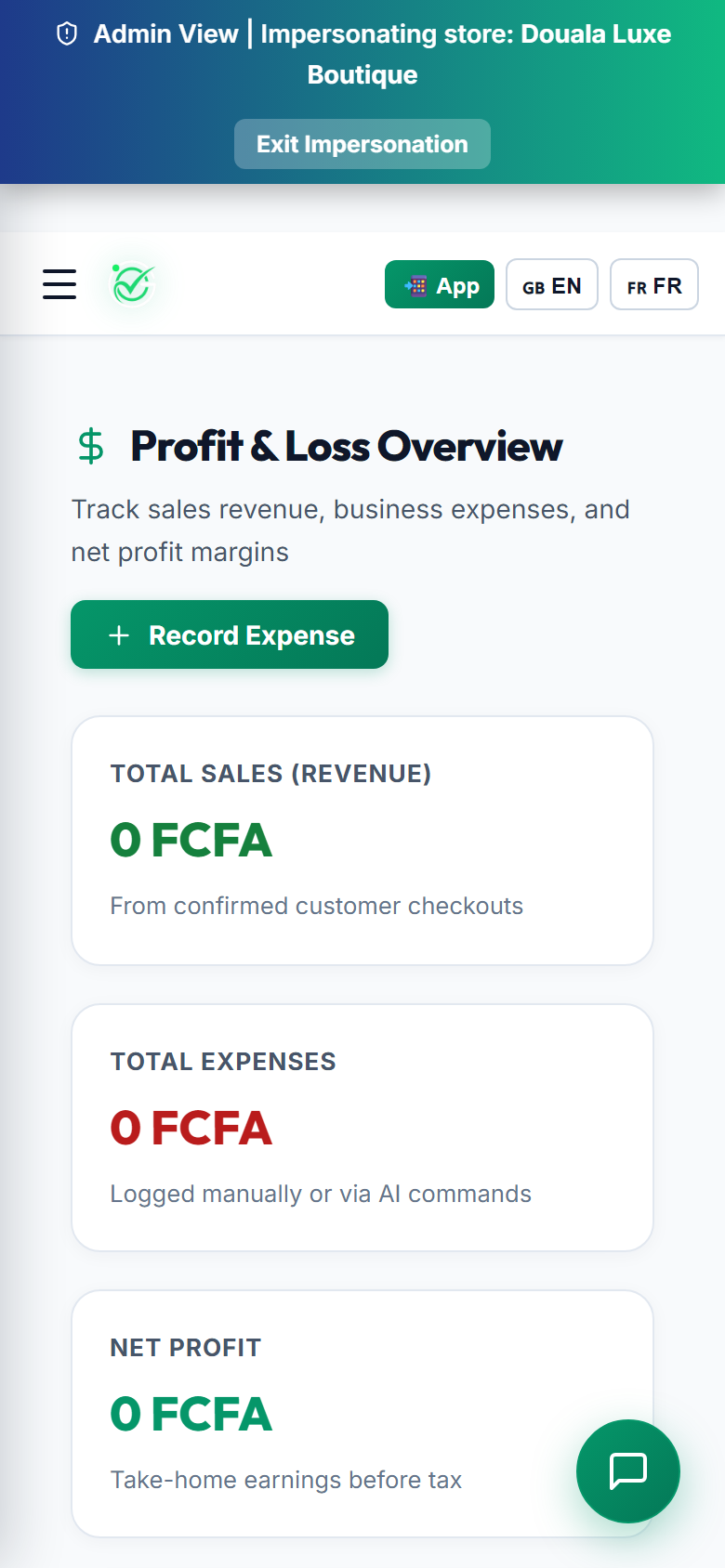
Know exactly how much profit your business makes. Groply calculates your total sales from approved orders and subtracts your private item costs and recorded expenses.

Profit & Loss Overview (Desktop View)
Figure M-10: Profit & Loss Dashboard: Total sales, expenses, net profit, and monthly trend graphs [Desktop View]
Profit & Loss Overview (Mobile View)
Figure M-10: Profit & Loss Dashboard: Total sales, expenses, net profit, and monthly trend graphs [Mobile Screen]

Financial Numbers Explained

πŸ’°

Total Sales

Total money collected in FCFA across all completed orders.

πŸ“‰

Total Expenses

Sum of your product costs plus any extra business expenses you record.

πŸ†

Net Take-Home Profit

Your real profit: calculated as Total Sales minus Total Expenses.

πŸ“Š

Profit Margin

Percentage showing how much profit you keep from every sale.

πŸͺ Merchant Milestone Β· 3 min read

Stage 11: Website Chat Widget Embed

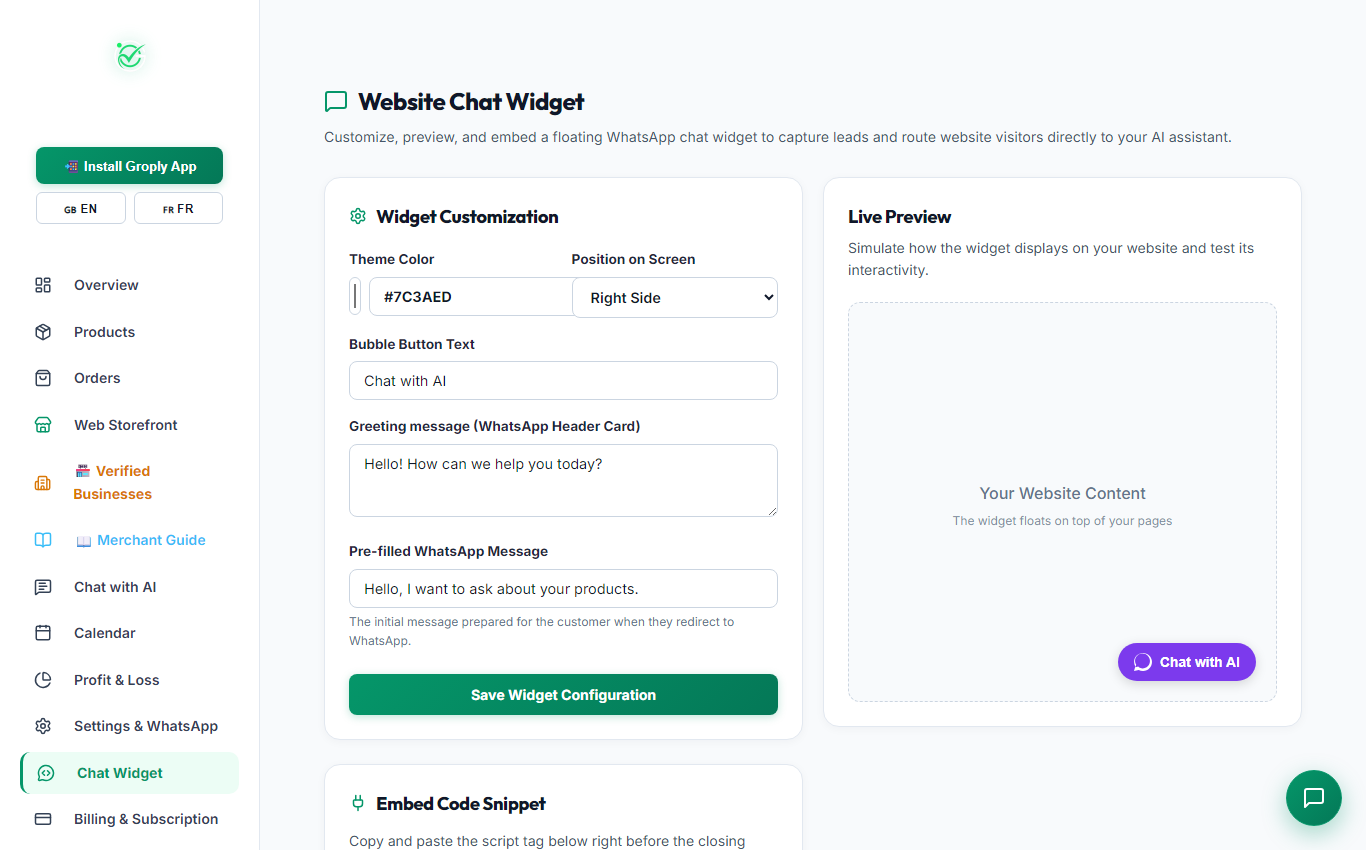
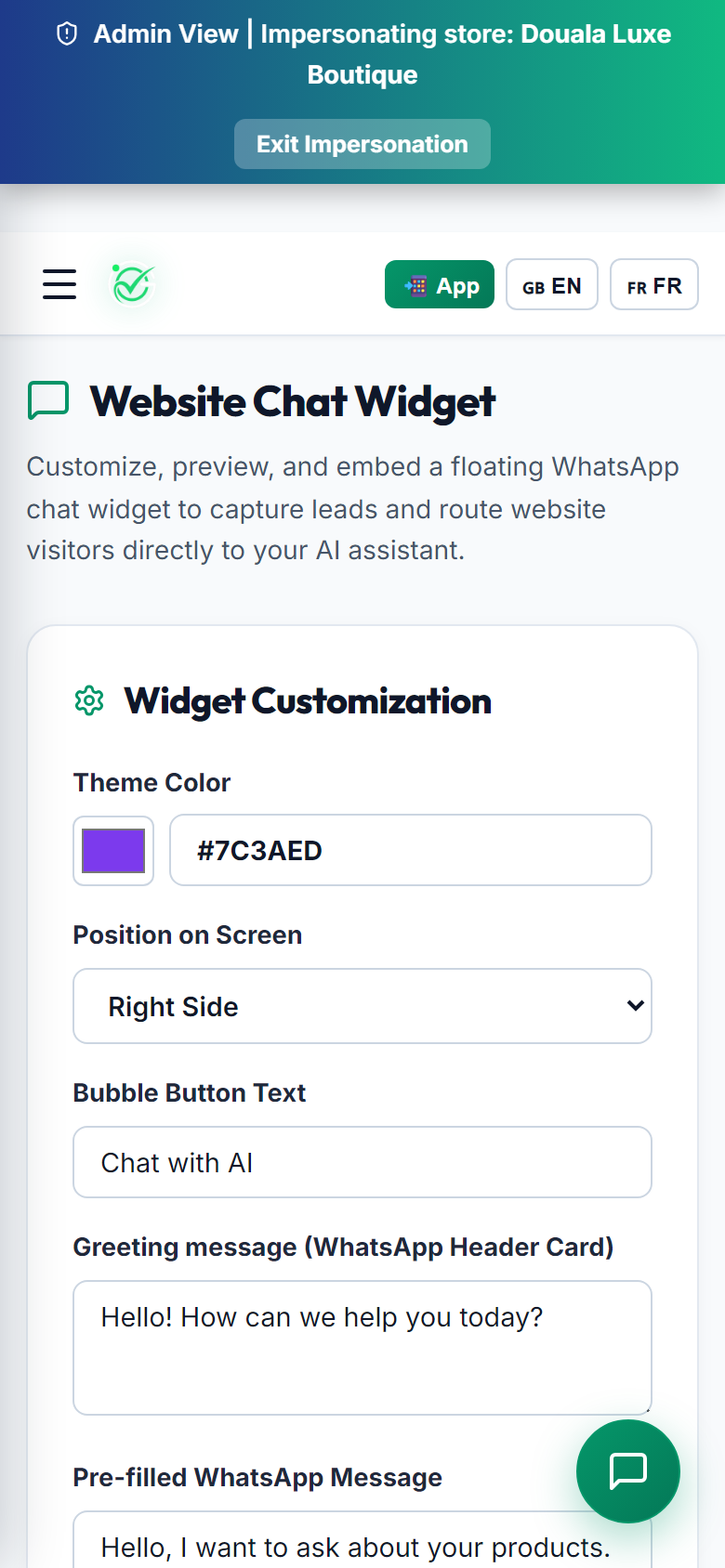
Add a floating WhatsApp AI chat button to your personal or company website with one line of code.

Screenshots:
🌐 Website Lead Capture

If you already have a website on WordPress, Shopify, Wix, or custom HTML, you can add your Groply AI sales assistant to turn website visitors into WhatsApp conversations.

Website Chat Widget (Desktop View)
Figure M-11: Chat Widget Studio: Customize button color, greeting text, and copy the embed code [Desktop View]
Website Chat Widget (Mobile View)
Figure M-11: Chat Widget Studio: Customize button color, greeting text, and copy the embed code [Mobile Screen]

Embed Code

Paste this script right before the closing </body> tag on your website:

<script src="https://groply.shop/static/widget.js" data-merchant-slug="YOUR_STORE_SLUG" async></script>

Customization Options

1
Color and Position

Pick a brand color and place the button on the bottom right or bottom left of your web pages.

2
Greeting Text

Set a friendly greeting card message (like "Hello! How can we help you today?").

3
Default Message

Pre-fill the initial customer question so they can start chatting with one tap.

πŸͺ Merchant Milestone Β· 3 min read

Stage 12: Billing & Subscriptions

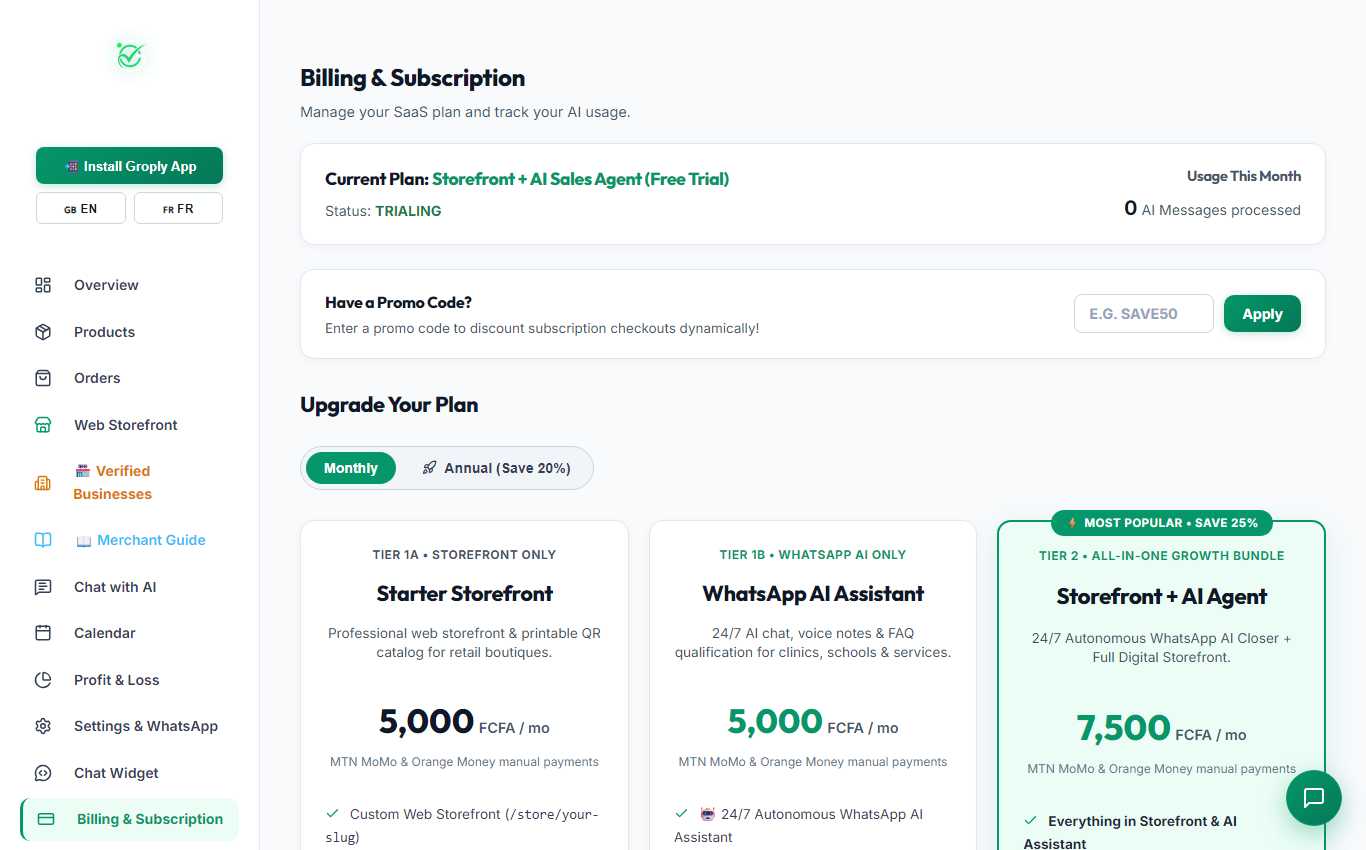
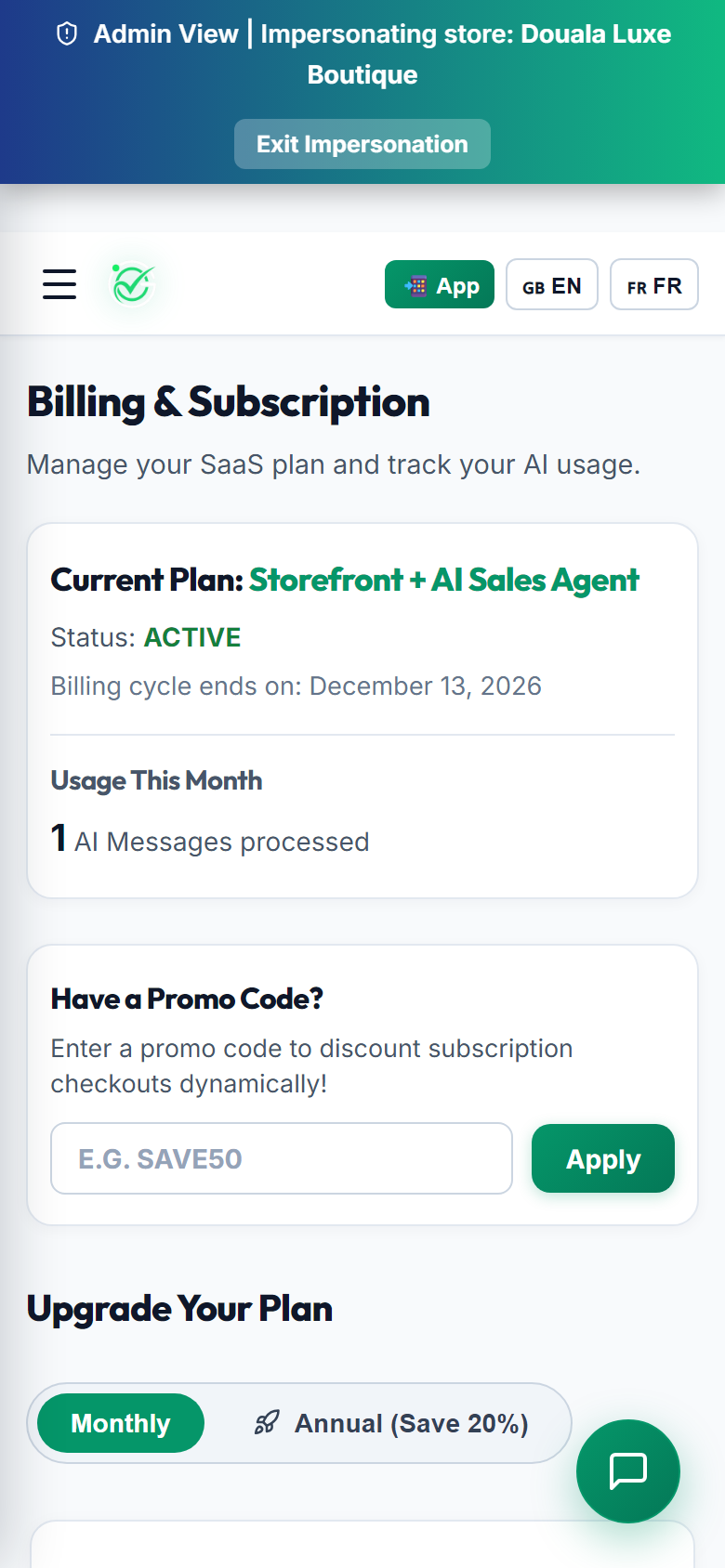
Manage your subscription plan, message limits, and renew easily using Mobile Money.

Screenshots:
πŸ’³ Simple Mobile Money Billing

Groply plans are made for Cameroonian businesses with flexible monthly subscriptions paid directly with MTN MoMo (*126#) or Orange Money (*150#).

Billing & Subscription (Desktop View)
Figure M-12: Subscription Dashboard: Active plan, renewal dates, and upgrade options [Desktop View]
Billing & Subscription (Mobile View)
Figure M-12: Subscription Dashboard: Active plan, renewal dates, and upgrade options [Mobile Screen]

Available Plans

🎁

Starter Storefront (0 FCFA)

Free online storefront link, printable QR posters, and manual WhatsApp ordering.

⚑

Growth AI

24/7 AI Sales Assistant on WhatsApp with 1,000 monthly messages and automatic MoMo receipts.

πŸš€

Business Pro

High-volume bot with 5,000+ AI messages, image recognition, and priority features.

πŸ‘‘

Enterprise Hub

Unlimited message bandwidth, dedicated setup, and personal support.

πŸͺ Merchant Milestone Β· 3 min read

Stage 13: Master AI Switch & Account Security

How to pause the AI assistant anytime and manage safe account logout.

Screenshots:
πŸ›‘οΈ Full Operational Control

As the business owner, you are always in complete control. You can turn off AI replies whenever you want, for example when counting inventory or during holidays.

Global AI Toggle & Logout (Desktop View)
Figure M-13: Sidebar Controls: Master AI switch and safe logout button [Desktop View]
Global AI Toggle & Logout (Mobile View)
Figure M-13: Sidebar Controls: Master AI switch and safe logout button [Mobile Screen]

Controls Explained

1
Disable AI Globally Switch

Located at the bottom of your sidebar. Clicking this turns off automated AI replies across WhatsApp and Web Widgets. Click again to re-enable anytime.

2
Safe Account Logout

Clicking "Logout" clears your login session safely when using shared or public computers.

3
Manual Chat Safety

Even while AI is paused, customer messages still arrive on your regular WhatsApp app so you can reply personally.

πŸͺ Merchant Milestone Β· 3 min read

Stage 14: Cameroon Sales Playbook & Prompts

How to sell on WhatsApp using Pidgin, French, and English, with regional bus delivery options.

Screenshots:
Stage 14: Cameroon Sales Playbook & Prompts
Figure M-14: Cameroon Commerce Playbook: Local sales handling and parcel waybills
πŸ‡¨πŸ‡² Local Commerce Playbook

Selling on WhatsApp in Cameroon works best with friendly conversation: answering price questions politely, confirming real stock, and arranging bus agency delivery across towns.

Example AI Sales Prompts

You can add these example instructions to your Learned Knowledge in Settings:

πŸ‡¨πŸ‡²

Cameroon Pidgin Prompt

"Always greet customers with warm local hospitality. If the customer speaks Pidgin, reply naturally: 'Yes boss, we get am for stock! Delivery na 1,000 FCFA within 2 hours. Pay via MTN MoMo or OM.'"
πŸ‡«πŸ‡·

French Sales Prompt

"Bonjour ! L'article est disponible en stock dans notre boutique. Nous assurons la livraison rapide Γ  domicile ou par agence de voyage (Touristique, Buca, Finexs)."

Supported Travel Agencies for Parcel Delivery

Popular transit agencies commonly used for orders:

  • Littoral and Centre: Buca Voyages, Finexs Voyages, General Express.
  • North-West and South-West: Amour Mezam, Vatican Express, Musango, Moghamo.
  • Grand Nord: Touristique Express.
πŸ›οΈ Shopper Milestone Β· 3 min read

Shopper Step 1: Discovering Verified Shops by Region

Find verified shops and products across Cameroon with real addresses and honest prices.

Screenshots:
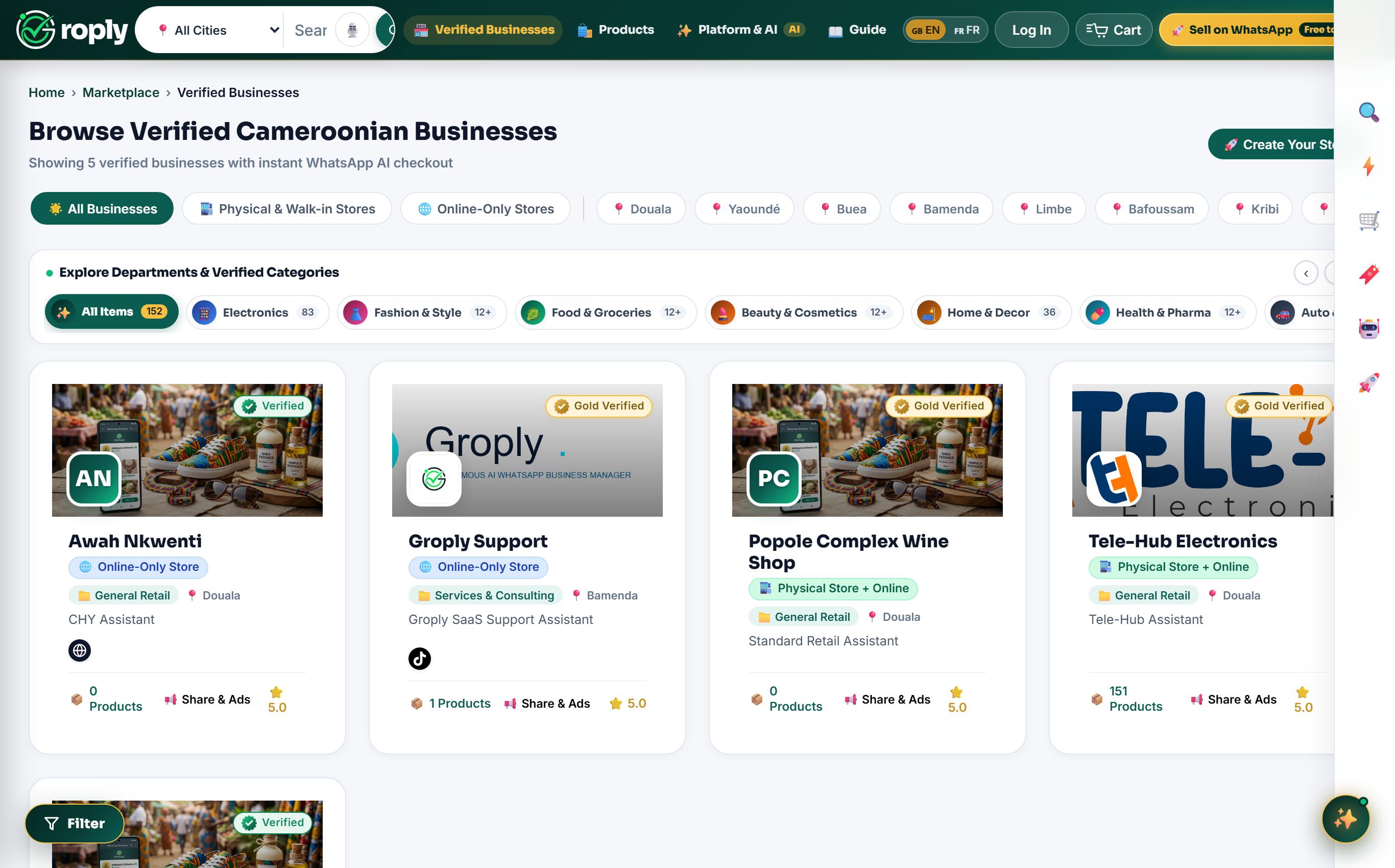
πŸ›‘οΈ Verified Cameroon Merchants

Groply connects you with registered local shops that have real physical locations, verified Mobile Money identities, and genuine customer feedback.

{render_dual_mockup('/static/images/guide/guide_s01_marketplace_discovery.png', '/static/images/guide/mobile/guide_s01_mobile_marketplace_discovery.png', 'Marketplace Discovery', 'Figure S-1: Marketplace Homepage: City selector, search bar, and verified shop cards')}

How to Browse Products in Your City

1
City Selector

Pick your city from the top menu (πŸ“ Bamenda, Douala, YaoundΓ©, Buea, Limbe, Bafoussam, Garoua, etc.) to see local shops near you.

2
Search Bar

Search by product name (for example: "sneakers", "iPhone", "solar battery"), category, or shop name.

3
Verified Badges

Look for the green βœ“ Verified checkmark and read real ratings from other buyers in Cameroon.

πŸ›οΈ Shopper Milestone Β· 3 min read

Shopper Step 2: Physical Boutiques vs Online Stores

Filter between physical walk-in shops with street addresses and online delivery merchants.

Screenshots:
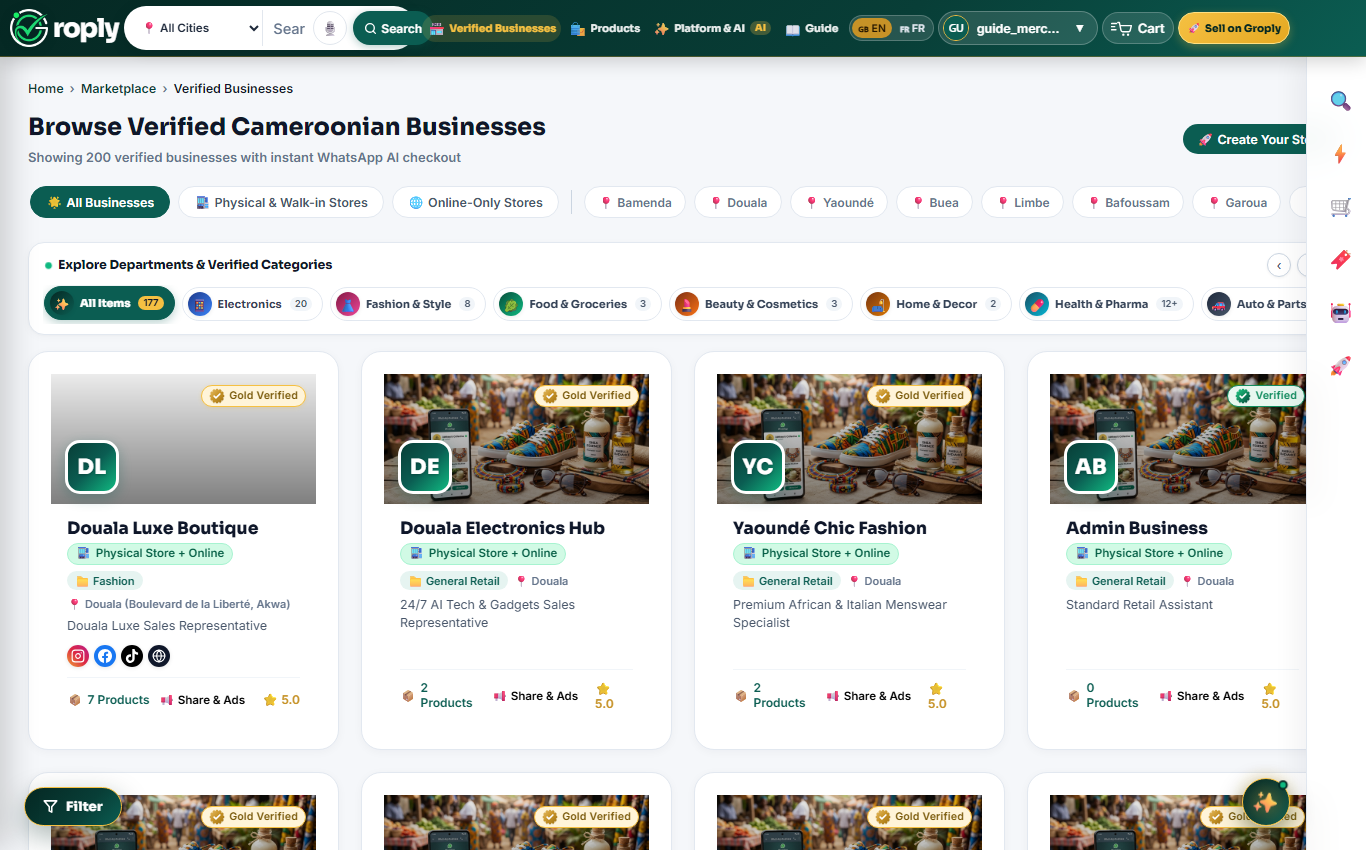
🏬 Walk-In or Delivery

Choose how you want to shop: visit a boutique in person or get delivery right to your door anywhere in Cameroon.

Stores Directory (Desktop View)
Figure S-2: Stores Directory: Filter by physical walk-in shops or online delivery stores [Desktop View]
Stores Directory (Mobile View)
Figure S-2: Stores Directory: Filter by physical walk-in shops or online delivery stores [Mobile Screen]

Store Directory Features

1
Shop Type Filters

Filter by 🏬 Physical Store + Online (walk-in shops with address) or 🚚 Online Delivery Only.

2
City Buttons

Switch easily between Bamenda, Douala, YaoundΓ©, Buea, Limbe, and Bafoussam.

3
Store Info & WhatsApp Link

See current stock count, opening hours, phone numbers, and official WhatsApp catalog link.

πŸ›οΈ Shopper Milestone Β· 3 min read

Shopper Step 3: 1-Click WhatsApp Ordering & 24/7 AI Chat

Order items directly on WhatsApp, chat in Pidgin, French, or English, and get immediate answers.

Screenshots:
πŸ’¬ Easy WhatsApp Shopping

No registration is needed to buy. When you click "Order on WhatsApp", Groply opens WhatsApp with your chosen items already listed. The shop's AI assistant replies in seconds.

Product WhatsApp Checkout (Desktop View)
Figure S-3: Product Page: Clear prices, delivery options, and 1-click WhatsApp order button [Desktop View]
Product WhatsApp Checkout (Mobile View)
Figure S-3: Product Page: Clear prices, delivery options, and 1-click WhatsApp order button [Mobile Screen]

How It Works

1
Transparent Prices in FCFA

See the real price clearly with no hidden fees.

2
Flexible Delivery

Choose between a local bike delivery in your neighborhood or bus agency shipping to other towns (Touristique, Buca, Finexs, General Express, Amour Mezam).

3
Order on WhatsApp Button

Click the green button to finish your order directly with the merchant on WhatsApp.

πŸ›οΈ Shopper Milestone Β· 3 min read

Shopper Step 4: Mobile Money Payment & Verified Reviews

Pay securely with MTN MoMo or Orange Money, get digital receipts, and leave ratings.

Screenshots:
πŸ›‘οΈ Safe Payments & Trust

Pay with peace of mind using MTN Mobile Money (*126#) or Orange Money (*150#) directly to the merchant's verified registered name.

Payment & Delivery Reviews (Desktop View)
Figure S-4: Buyer Protection: Direct MoMo payments, parcel tracking, and verified customer ratings [Desktop View]
Payment & Delivery Reviews (Mobile View)
Figure S-4: Buyer Protection: Direct MoMo payments, parcel tracking, and verified customer ratings [Mobile Screen]

Buyer Protection

1
Anti-Scam Protection

Always verify the name. Groply shows you the exact registered merchant name before you send money.

2
Agency Receipt & Tracking Code

For inter-city shipping, merchants send you the official bus agency waybill receipt number to collect your package at the agency counter.

3
5-Star Reviews

Leave a review after receiving your package to help other shoppers find the best shops.

πŸ“š Article & Study Β· 5 min read

Market Report 1

Why WhatsApp Became Cameroon's Real Online Marketplace: An analysis of consumer trust, Mobile Money speed, and informal retail dynamics.

For more than a decade, traditional e-commerce platforms tried to replicate Western-style web checkouts in Central Africa. Most of those platforms struggled to grow or shut down entirely. The reason was simple: retail commerce in Cameroon has always been relational, conversational, and built on direct personal trust.

Instead of logging into heavy websites, entering credit cards, and waiting days for email receipts, Cameroonian shoppers chose a different path. They turned WhatsApp into the country's true digital marketplace.

1. The Psychology of Trust and Anti-Scam Protection

Online shoppers in cities like Douala, YaoundΓ©, and Bamenda are naturally cautious about online fraud. When a buyer visits a cold website form, uncertainty is high. There is no face, no voice, and no proof that the shop actually exists.

When that same buyer opens a WhatsApp chat, the experience changes completely. They can ask questions, request a live photo of the item from a different angle, hear a friendly voice note, and verify a local phone number. Direct human conversation removes anxiety and builds the confidence needed to make a purchase.

"Commerce in Cameroon is relational before it is transactional. The businesses that win are not the ones with complicated websites, but the ones that make buying feel as natural as talking to a trusted neighbor." Groply Market Insights Team

2. Mobile Money as the Native Currency of Commerce

Mobile Money changed everyday trade across the country. MTN MoMo (*126#) and Orange Money (*150#) replaced the need for bank accounts and credit cards. Payments happen in seconds directly from mobile phones.

Because Mobile Money displays the registered name of the merchant before the buyer enters their secret PIN, it provides built-in identity verification. Buyers feel protected knowing exactly who is receiving the payment, while sellers get instant SMS confirmation on their phones without waiting for banking clearances.

3. The Inter-City Bus Agency Logistics Network

Without a formal postal address system, Cameroonian merchants and buyers built their own nationwide shipping network using trusted travel bus agencies. Agencies like Touristique Express, Finexs, Buca Voyages, and Amour Mezam connect every region daily.

A boutique in Douala can receive a WhatsApp order at 9:00 AM, drop the parcel at an agency counter by 10:00 AM, and the customer in YaoundΓ© or Bafoussam collects it the very same afternoon with an official waybill receipt code. It is fast, affordable, and highly reliable.

πŸ“Œ Key Market Observations

  • Over 68% of digital retail inquiries in major cities start directly inside WhatsApp.
  • More than 90% of completed remote orders settle via MTN MoMo or Orange Money.
  • Response speed is the single biggest factor: buyers message multiple vendors and buy from whoever replies first.
  • Physical shop credibility combined with WhatsApp accessibility creates the highest customer retention rate.
πŸ“š Article & Study Β· 5 min read

Growth Playbook 1

How Local Brands Win Trust and Close Deals on WhatsApp: Practical conversational strategies, pricing psychology, and communication habits that turn chat inquiries into paid orders.

Selling through chat is very different from running a physical shop or placing social media ads. On WhatsApp, your conversation is your storefront. The way you greet a customer, answer price questions, and guide them to payment determines whether you make a sale or lose the buyer to a competitor.

1. The 5-Minute Window of Opportunity

When a buyer taps your store link and sends a message asking "Is this available?", their intent to buy is at its highest point. They are holding their phone, interested in the item, and ready to spend.

If you take two hours to reply, their attention shifts elsewhere, or they buy from another vendor who answered right away. Data shows that responding within 5 minutes results in four times higher conversions than responding after an hour. Speed is your biggest sales tool.

2. Visual Clarity: Photos Outsell Text Descriptions

Mobile shoppers scan quickly and rarely read long paragraphs of specifications. When a customer asks about a specific item, the most effective response is visual.

Send one clear, well-lit photo of the actual product first. Follow it immediately with a short, clean message stating the price in FCFA and confirming stock availability. Keeping your message concise makes it easy for the buyer to say yes.

"When a customer asks 'how much last?', they are not rejecting your price. They are signaling that they want to buy and are asking for an invitation to close the deal." Sales Strategy Principle

3. Handling Price Bargaining Without Destroying Margins

In Cameroonian trade, asking for a discount is a natural part of doing business. Ignoring the question or responding rudely drives buyers away. However, giving away massive discounts ruins your profit margins.

The solution is value-based closing: instead of slashing prices, offer a small courtesy (like 500 FCFA off delivery) or invite them to buy two items for a bundled package price. This satisfies the buyer's desire for a good deal while keeping your profit healthy.

4. Eliminating Pre-Payment Hesitation

Why do customers abandon chats right at the payment step? Almost always, it is because they fear sending Mobile Money to an unverified number and receiving nothing in return.

To eliminate this hesitation, always state your exact registered Mobile Money name clearly, provide your physical shop address or landmark, and clearly explain how and when their package will be delivered.

πŸ“Œ Practical Growth Habits

  • State the exact total including delivery fees upfront so there are no surprises.
  • Always confirm your registered Mobile Money name before asking for payment.
  • Send an official receipt message or waybill number as soon as payment arrives.
  • Follow up 48 hours after delivery to ask if they are happy with the product.
πŸ“š Article & Study Β· 5 min read

Retail Guide 1

Connecting Physical Boutiques with 24/7 WhatsApp Commerce: How brick-and-mortar shop owners in Douala, YaoundΓ©, and Bamenda can turn walk-in foot traffic into lifelong repeat buyers.

Every day, dozens of people walk past boutiques on Commercial Avenue in Bamenda, Akwa in Douala, and Bastos in YaoundΓ©. Some walk inside, browse your racks, admire the quality of your goods, and then leave saying "I will come back."

In most cases, they never do. Not because they disliked your products, but because life gets busy and they simply forget. Without a direct digital channel, every shopper who walks out your door is a lost opportunity.

1. The Physical Store as a Trust Anchor

Having a physical shop in your town is a massive commercial advantage that online-only vendors do not have. A physical storefront proves that you are a legitimate, established business with real inventory and real accountability.

The goal is not to replace your physical boutique, but to give your existing walk-in customers an effortless way to keep shopping with you from their home or office at any hour of the day.

"Your physical shop gives you local trust. Your WhatsApp storefront gives you 24/7 selling reach. When you connect both, your boutique never truly closes." Retail Omnichannel Insight

2. Creating Simple Physical-to-Digital Touchpoints

Turning foot traffic into connected WhatsApp buyers does not require complex hardware. It requires simple, visible invitations throughout your shop:

  • Storefront Window QR Posters: Stick a high-visibility QR poster on your glass door so people walking by in the evening or on Sundays can scan and browse your full catalog.
  • Shopping Bag Cards: Place a small printed thank-you card inside every bag with your store link and WhatsApp number.
  • Counter Engagement: Train shop attendants to invite customers: "Scan here to see our new weekly arrivals directly on your WhatsApp."

3. The Convenience of In-Store Pickups

Modern shoppers value time. Many customers prefer browsing new stock on WhatsApp during their morning break, paying via Mobile Money, and stopping by your shop on their way home to pick up their packaged order in 30 seconds without waiting in line.

Offering in-store pickup as a free option strengthens customer relationships and gives buyers an excuse to visit your boutique regularly.

4. Inventory Discipline Between Shop and Chat

The quickest way to frustrate a customer is confirming an order on WhatsApp only to discover that the item was sold to a walk-in shopper an hour earlier. Keeping your product availability updated ensures your assistant only quotes items that are truly on your shelves.

πŸ“Œ Retail Action Checklist

  • Place a clean QR code poster at your checkout counter and entrance door.
  • Include your WhatsApp store link on all printed receipts and shopping bags.
  • Offer in-store pickup for customers who want to try items on in person.
  • Send a weekly WhatsApp update to past buyers showcasing your newest stock arrivals.
πŸ“š Article & Study Β· 5 min read

Why Cameroon Businesses Should Join Groply

How 24/7 autonomous WhatsApp sales, smart bargaining, instant MoMo verification, and 0% commission help Cameroonian merchants sell non-stop across all 10 regions.

If you run a boutique, tech shop, cosmetics counter, or retail brand in Cameroon, you already know one undisputed fact: WhatsApp is the true digital marketplace of our economy. From Commercial Avenue in Bamenda to the vibrant markets of Akwa in Douala and Mokolo in YaoundΓ©, customers do not want to fill out complicated website forms. They want to open WhatsApp, ask if an item is available, negotiate the price, and pay with Mobile Money.

Yet for most business owners, selling through WhatsApp manually is exhausting. You spend entire evenings answering the same questions: "Is this still available?", "How much last?", and "Where is your shop located?". When you are asleep or attending to walk-in customers, messages pile up. By the time you reply two hours later, the customer has already purchased from someone else. Groply was built specifically to solve this problem.

1. Your 24/7 Autonomous WhatsApp AI Sales Rep

Imagine hiring a dedicated sales manager who never sleeps, never takes a day off, speaks English, French, and Cameroonian Pidgin fluently, and replies to every customer inquiry in under three seconds. That is what Groply brings to your shop.

Connected directly to your WhatsApp Business number, your assistant knows your full catalog, stock levels, shop address, and delivery rates. When a shopper messages at 11:30 PM on a Sunday, the AI greets them warmly, sends photos of the exact item they requested, answers questions, and guides them directly to payment.

"In Cameroonian commerce, speed equals trust. The merchant who replies in three seconds will always win the sale over the competitor who replies in three hours." Groply Commercial Insight

2. Smart Price Bargaining Within Safe Margins

Bargaining is natural in Cameroonian commerce. When a customer asks "how much last?", rigid bots fail because they only repeat a fixed number, driving buyers away.

Groply handles negotiations intelligently. You set a public price and a private minimum acceptable price (min_accept_price). Your AI negotiates with customers respectfully, offering sensible discounts within your limits while strictly protecting your profits.

3. Instant MTN MoMo & Orange Money Verification

Cash on delivery outside your quarter is risky, and bank transfers are too slow. Groply integrates natively with Cameroon's primary payment systems: MTN MoMo (*126#) and Orange Money (*150#).

When an order is confirmed, Groply shares your exact Mobile Money details. Once the buyer pays, you can quickly verify the transaction ID in your dashboard, eliminating fake SMS alerts and keeping your revenue completely safe.

4. Zero Commission: Keep 100% of Every Franc CFA

Many online platforms take 10% to 25% of every transaction. On tight retail margins, giving up a quarter of your revenue destroys profitability.

Groply charges zero transaction fees: just 5,000 FCFA per month for Starter or 7,500 FCFA for the Growth Bundle. Whether you sell 200,000 FCFA or 10,000,000 FCFA this month, Groply takes zero commission. Every franc CFA you earn stays yours.

5. Zero KYC Hassles: Launch in Under 5 Minutes

Opening an account with foreign platforms often requires submitting national ID cards, tax papers, and waiting days for review. Groply requires zero KYC. You simply sign up with your phone number or email, choose your town, add your products, and your WhatsApp storefront is immediately live.

6. Nationwide Reach Across All 10 Regions

Whether your physical store is in Douala, YaoundΓ©, Bamenda, Buea, or Bafoussam, Groply expands your reach across Cameroon. Your custom link (groply.shop/store/your-name) gives you a clean catalog for your social media channels. When out-of-town buyers order, Groply helps you coordinate agency bus delivery via Touristique, Buca Voyages, Finexs, or Amour Mezam.

πŸ“Œ Why Cameroon Businesses Choose Groply

  • Instant 3-Second Replies: Never lose late-night or weekend shoppers to slow replies.
  • Automated MoMo & OM: Collect mobile payments safely with instant verification.
  • 0% Commission: Predictable fixed pricing at 5,000 FCFA or 7,500 FCFA per month.
  • Zero KYC Delay: Start selling in under five minutes with no paperwork.
  • Storefront QR Integration: Turn walk-in foot traffic into lifelong digital buyers.

πŸ“š Article & Study Β· 5 min read

Beating Inflation: Smart Visuals, Live Pricing & 24/7 WhatsApp AI

How Cameroon retail merchants survive inflation: replacing messy group image spam with live pricing, 1-tap background removal, and a 24/7 WhatsApp AI sales rep that never loses a customer.

Every business owner in Cameroon feels the pressure of rising costs today. From Mokolo Market in Yaounde to Akwa in Douala and Commercial Avenue in Bamenda, everyday product prices are shifting constantly. Transport fares climb, import fees fluctuate, and wholesale distributors update rate sheets regularly. Staying profitable requires adapting fast.

Yet thousands of merchants still rely on an exhausting routine: downloading photos and repeatedly re-depositing the same product images across WhatsApp groups, Facebook spaces, and status updates every morning. During inflation, this manual habit fails. Here is why image spam breaks down, and how smart merchants use clean visuals, live pricing, and 24/7 AI to thrive.
1. The Group Re-Posting Trap: Why Image Spam Fails Under Inflation

When prices fluctuate, scattering static photos across social media creates major friction. Many sellers write prices directly onto product photos or paste them into captions. Once you share an image into multiple groups, that picture stays on customers' phones indefinitely.

Two weeks later, supplier costs jump from 12,000 FCFA to 15,000 FCFA. A customer finds your old post, messages your WhatsApp, and demands the old price. Explaining that inflation forced rates up makes the buyer feel misled or suspicious. You waste time defending new rates instead of making sales.

Worse, re-depositing raw photos every morning clogs phone storage, burns mobile data bundles, and annoys group members who tune out repetitive visual clutter.

2. The Studio Look with 1-Tap Background Removal

During inflation, shoppers become far more selective. They compare options carefully and choose to spend with businesses that look legitimate, trustworthy, and established.

Snapping pictures in a busy market stall often captures cluttered backgrounds: dusty floors, carton boxes, or poor lighting. Messy backgrounds signal an informal seller, inviting aggressive bargaining and driving perceived value down.

You do not need an expensive photography studio. Simple mobile apps like remove.bg, PhotoRoom, or your phone's built-in cutout feature remove distracting backgrounds in two seconds with one tap. Placing your items on a clean white or studio backdrop instantly elevates your brand, justifying your prices before negotiations even begin.

"In an inflationary market, presentation is your greatest pricing power. Clean product photos signal quality, reduce aggressive haggling, and justify your prices instantly." Groply Merchant Growth Principle

3. Live Centralized Pricing: Update Once, Protect Margins Everywhere

The antidote to inflation is having a single source of truth for your catalog. Instead of re-typing prices across dozens of social posts, modern merchants direct customers to their personalized Groply storefront link (groply.shop/store/your-store).

When your distributor adjusts wholesale costs, you log into your Groply dashboard and update the product price in ten seconds. That single update instantly reflects across your online store, in automated catalog responses, and in every checkout link. You never have to track down old posts or apologize for outdated captions. Your profit margins stay protected in real time.

4. The 24/7 AI Sales Person: You Never Lose a Customer

Inflation causes consumers to compare prices more aggressively. Because shoppers work during the day, comparison shopping happens late at night (10:00 PM to 1:00 AM) or early in the morning before work.

When an interested customer messages your WhatsApp at 11:30 PM asking "Is this available? What is your last price?", an asleep merchant cannot reply. By 7:30 AM, that customer has messaged other shops and bought elsewhere. Slow replies mean lost revenue.

Groply equips your business with an autonomous WhatsApp AI sales rep working 24/7. It replies in three seconds, welcomes shoppers in English or French, shares clean studio photos, and confirms live stock.

When the shopper asks for a discount, the AI negotiates intelligently within your pre-configured minimum acceptable price (min_accept_price). It protects your profits while making the customer feel valued. It provides your verified MTN MoMo (*126#) or Orange Money (*150#) payment details and closes the sale while you rest. You never lose a customer.

πŸ“Œ Practical Action Steps for Cameroon Merchants

  • Stop Image Dumping: Replace repetitive group photo spam with your verified Groply storefront link.
  • Use 1-Tap Background Removal: Clean up market stall photos with tools like remove.bg to command premium prices.
  • Centralize Your Pricing: Update prices in your dashboard in seconds when supplier rates change.
  • Deploy 24/7 WhatsApp AI: Capture midnight and weekend sales automatically so no inquiry is ever lost.
  • Collect Payments Safely: Use automated MoMo and OM instructions with 0% transaction fees.